
Connector Module
Connectors are the third class of wick module beside Tools and Jobs. They wrap one external API and expose it to LLM clients (Claude, Cursor, custom agents) over MCP. Where Tools are designed for humans clicking a UI and Jobs run on a schedule, connectors exist so an LLM can call your APIs with structured input/output and full audit logging — no protocol code on your side.
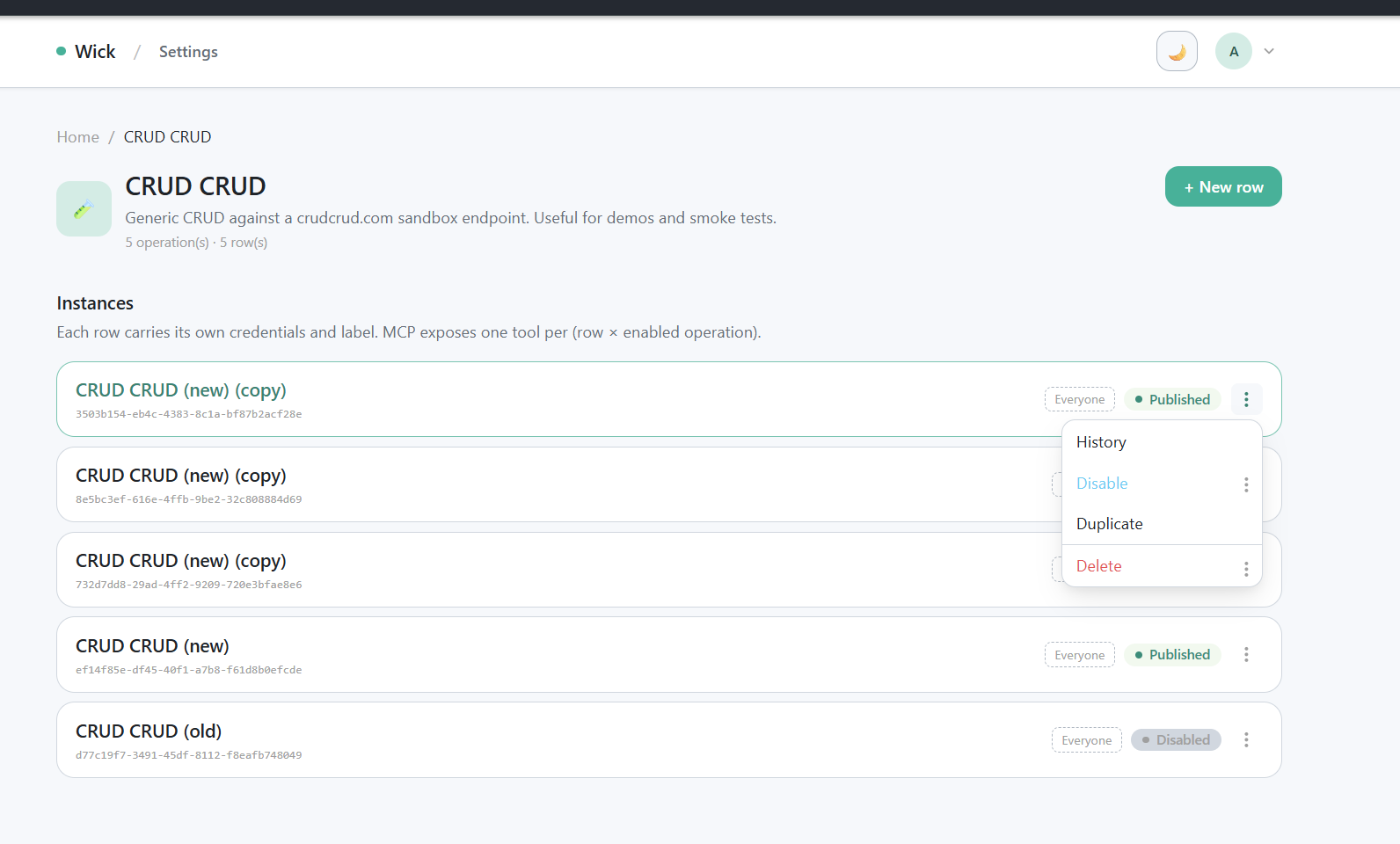
/manager/connectors/{key} list page with stacked rows + tag chips + kebab menu.
Mental model
- One connector module wraps one external API.
- It carries one shared
Configsstruct (URL, token, …) plus NOperations— small, named actions an LLM can call (query,list_repos,create_issue). - Each operation has its own typed
Inputstruct (turned into MCP JSON Schema) and its ownExecuteFunc. - An admin can spawn many rows per definition at runtime through
/manager/connectors/{key}— each row carries its own credentials, label, and tags. Same Go code, different rows = different (env, team, account). - LLMs do not see N×M static tools. The MCP server exposes a fixed meta surface (
wick_list,wick_search,wick_get,wick_execute); each (row × operation) pair is addressed by an opaquetool_idof the formconn:{connector_id}/{op_key}. See the MCP guide for the full transport story.
Before you build
Before writing a single line, lock down the API contract. Connectors are LLM-facing and the wrong shape costs more to fix than to gather upfront. Ask the user (or skim the upstream docs yourself) for:
| What to gather | Why it matters |
|---|---|
| Endpoint + auth — base URL, auth scheme (bearer token, basic, header key, OAuth), required scopes | Becomes the Configs struct. Auth scheme decides whether one credential field is enough or you need several. |
| One concrete sample request per operation — method, URL, headers, query params, body | Drives the Input struct shape and the request builder in repo.go. Don't guess from a description. |
| One concrete sample response per operation — both happy path and a typical error | Drives the typed return shape and the error parser. Upstream error envelopes differ wildly; pick the wrong field and run history shows blank errors. |
| Which ops mutate state — and how reversible each one is | Decides Op vs OpDestructive. Destructive ops default off on every new row; missing the flag means the LLM can fire them silently. |
| Pagination, rate limit, retry quirks | Decides whether the op needs a cursor/page input, and whether to surface limit headers as errors instead of swallowing them. |
| Default tags — public to every approved user, or restricted by filter tag? | Every new connector ships with tags.Connector (group-only) so it appears under the "Connector" group on the home page — set this in Meta.DefaultTags. Filter tags (tags.System etc.) require an explicit ask; never add one on your own initiative. |
Paste the sample request/response into the conversation before coding. It is much easier to align on shape with a real payload in front of you than to reverse-engineer it from prose.
File structure
Connectors mirror the tool module split — three files, one job each:
connectors/my-connector/
├── connector.go    # Meta + Configs + per-op Input structs + Operations() + thin op handlers
├── service.go      # pure Go logic — input validation, URL/body construction, response shaping
└── repo.go         # outbound I/O — HTTP calls, DB, S3 (everything that touches the network)
Why split:
connector.gostays scannable. A reader can read Meta, Configs, every Input struct, every Operation description, and the dispatch shape of every handler without scrolling past validation logic or HTTP wiring.service.gois unit-testable in isolation. Validators and URL builders take a*connector.Ctx(or plain values) and return data — no network, no fixtures, fast tests.repo.gois where the goroutine-leak rule lives. Concentrating everyhttp.NewRequestWithContextcall in one file makes the rule easy to enforce and easy to audit.
Handlers in connector.go should read like a five-line outline: validate via service.go, dispatch via repo.go, return. Anything that grows beyond "parse, validate, dispatch" belongs in service.go.
The shipped example connectors/crudcrud/ follows this layout — five operations including one destructive, end-to-end.
Register in main.go
import "<projectmod>/connectors/myconnector"

app.RegisterConnector(
    myconnector.Meta(),
    myconnector.Configs{
        BaseURL: "https://api.example.com", // seed; admins can change after first boot
    },
    myconnector.Operations(),
)
One call = one connector definition. Wick auto-seeds one empty row in the connectors table on first boot. Admins fill in the credential values at /manager/connectors/{key}/{id} before any operation can run.
- Existing rows are never overwritten on subsequent boots.
- Two registrations with the same
Meta.Keycause a fatal boot error. - A
Keywhose module backing has been removed is tolerated: the row stays in the DB, marked "Module not registered" in the admin UI; calls return an error.
Connector contract
Meta()
func Meta() connector.Meta {
    return connector.Meta{
        Key:         "github",
        Name:        "GitHub",
        Description: "Read repos, issues, and pull requests on GitHub.",
        Icon:        "🐙",
        DefaultTags: []tool.DefaultTag{tags.Connector},
    }
}| Field | Description |
|---|---|
Key | Unique slug across all connectors. Drives the admin URL /manager/connectors/{Key} |
Name | Display name on the admin card and detail page |
Description | Shown to admins on the connector card, and to the LLM as the connector's description in wick_list/wick_search/wick_get. The per-instance admin note (see Per-row management UI ▶ AI description) rides alongside as a separate operator_note field there, and is appended to this text in the wickmanager connector_list/connector_get ops. Per-operation detail comes from each Operation Description — see below. |
Icon | Emoji or short string |
DefaultTags | Tags attached to every freshly seeded row. Every connector should include tags.Connector so the home page groups it under "Connector". Add module-specific tags on top of that (e.g. tags.System for built-in maintenance connectors). Admin unlinks survive restarts — boot only seeds when a row has zero tag links yet. |
Fixed | When true, only one row may exist for this Key. Useful for connectors backed by a single in-process resource. |
RequireAIDescription | When true, an instance with a blank AI description reports as needs_setup — the description becomes mandatory, like a missing required config field, and the instance shows as unfinished until it's filled. Use it where an undocumented instance is a liability (e.g. a connector on a personal token that should always record who may use it). Default false = description stays optional. |
Configs struct
Per-instance credentials and endpoints, shared across every operation. Reflected by entity.StructToConfigs into the admin form.
type Configs struct {
    BaseURL string `wick:"url;required;desc=GitHub API base URL. Default: https://api.github.com"`
    Token   string `wick:"secret;required;desc=Personal access token with the scopes you intend to use."`
}
The wick:"..." tag grammar is shared with Tools and Jobs. See the Config Tag Reference for the full widget table and all flags. Common modifiers:
| Tag | Effect |
|---|---|
required | Admin must fill before any op can run |
secret | Masked in the UI and marks the field for plaintext auto-mask in the encrypted-fields layer. Round-tripping a wick_enc_ token through any field (secret-tagged or not) is now covered automatically — every plaintext produced by decrypting an incoming token is re-masked on the way out. The secret tag is still the right signal whenever the field can also be filled in plaintext (e.g. by an admin pasting a raw credential into the form). |
url, email, textarea, dropdown=a|b|c, kvlist=col1|col2 | Widget overrides |
desc=... | Help text shown next to the field |
key=custom_name | Override the snake_cased field name |
Read at runtime via c.Cfg("base_url"), c.CfgInt("port"), c.CfgBool("use_tls"). Reads always return plaintext — the encrypted-fields layer happens around ExecuteFunc, not inside it. For sensitive values that come back from the upstream API and aren't declared as Configs/Input fields, mask them yourself with c.Mask(data, values) (or c.MaskIgnoreCase for case-folded matching) before returning. Every value passed to c.Mask is also remembered for the framework's post-Execute auto-mask sweep, so the same value leaking into a different response field gets masked too — no need to thread it through every site manually.
Per-operation Input structs
Each operation has its own input schema. Same tag grammar; the framework reflects each one into the JSON Schema the MCP client sees in wick_get.
type ListReposInput struct {
    Org        string `wick:"required;desc=Organization login. Example: anthropics"`
    Visibility string `wick:"dropdown=all|public|private;desc=Filter by repo visibility."`
    PerPage    int    `wick:"desc=Page size (1-100). Default 30."`
}
Read at runtime via c.Input("org"), c.InputInt("per_page"), c.InputBool("include_archived").
Operations()
Operations() returns []connector.Category — operations grouped into titled, described sections via connector.Cat(title, description, ...ops). The admin detail page renders one card per category (title + description + ops table + per-card Enable/Disable all). A sticky "Sections" jump sidebar lists every category with its op count.
func Operations() []connector.Category {
    return []connector.Category{
        connector.Cat("Repositories", "Browse and inspect repositories.",
            connector.Op(
                "list_repos",
                "List Repositories",
                "List repositories under {org}. Returns repo name, full_name, default_branch, visibility, and updated_at.",
                ListReposInput{},
                listRepos,
            ),
        ),
        connector.Cat("Issues", "Read and mutate issues.",
            connector.OpDestructive(
                "close_issue",
                "Close Issue",
                "Close the given issue on {owner}/{repo}. Reversible only by reopening; comments and history are preserved.",
                CloseIssueInput{},
                closeIssue,
            ),
        ),
    }
}
Use connector.Cat("", "", ops...) for an ungrouped/flat list — an empty title means the ops render without a section header.
Code that needs to iterate every op regardless of grouping calls module.AllOps(). To find which category an op belongs to, use module.CategoryOf(opKey).
| Constructor | When to use |
|---|---|
connector.Cat(title, desc, ops...) | Groups ops into a named section on the detail page. Use one Cat per logical feature area. |
connector.Op(...) | Read-only or idempotent writes that can be safely retried |
connector.OpDestructive(...) | Actions that mutate state in a hard-to-undo way — DELETE, send-message, post-comment, force-push |
Destructive ops are enabled by default on every new row. The MCP layer appends a ⚠ DESTRUCTIVE: Always confirm with the user before executing this operation. warning to the op description in every wick_list / wick_search / wick_get response, so the LLM (and user) is aware before calling. Admins can still disable individual ops per row at /manager/connectors/{key}/{id}.
Description discipline
Operation.Description is load-bearing: it appears verbatim in the MCP wick_list / wick_search payload and is the primary signal an LLM uses to decide whether to call the op.
Write action verbs and be specific:
- ✅ "Search Loki using LogQL. Returns log lines with timestamp + labels. Empty result = empty array."
- ✅ "Send a Slack message to {channel}. Returns the posted message timestamp on success."
- ❌ "query loki"
- ❌ "send slack"
ExecuteFunc
func listRepos(c *connector.Ctx) (any, error) {
    org := strings.TrimSpace(c.Input("org"))
    if org == "" {
        return nil, errors.New("org is required")
    }

    base := strings.TrimRight(c.Cfg("base_url"), "/")
    url := fmt.Sprintf("%s/orgs/%s/repos", base, org)

    req, err := http.NewRequestWithContext(c.Context(), http.MethodGet, url, nil)
    if err != nil {
        return nil, fmt.Errorf("build request: %w", err)
    }
    req.Header.Set("Authorization", "Bearer "+c.Cfg("token"))
    req.Header.Set("Accept", "application/vnd.github+json")

    resp, err := c.HTTP.Do(req)
    if err != nil {
        return nil, fmt.Errorf("call github: %w", err)
    }
    defer resp.Body.Close()
    raw, _ := io.ReadAll(resp.Body)
    if resp.StatusCode < 200 || resp.StatusCode >= 300 {
        return nil, fmt.Errorf("github %d: %s", resp.StatusCode, strings.TrimSpace(string(raw)))
    }

    var out []struct {
        Name          string `json:"name"`
        FullName      string `json:"full_name"`
        DefaultBranch string `json:"default_branch"`
        Visibility    string `json:"visibility"`
    }
    if err := json.Unmarshal(raw, &out); err != nil {
        return nil, fmt.Errorf("decode response: %w", err)
    }
    return out, nil
}
Ctx helpers
| Helper | Description |
|---|---|
c.Cfg("key") | Read a credential / config value (string) |
c.CfgInt("key") | Same, parsed as int (0 on parse failure) |
c.CfgBool("key") | Same, parsed as bool (true/1/yes/on) |
c.Input("key") | Read an LLM-supplied input (string) |
c.InputInt("key") | Same, as int |
c.InputBool("key") | Same, as bool |
c.Context() | The cancellation context. Always pass into http.NewRequestWithContext |
c.HTTP | Default *http.Client with a 30s timeout |
c.InstanceID() | Connector row ID — useful for structured logging |
c.ReportProgress(progress, total, message) | Emit progress for long-running calls (no-op on JSON transport) |
Best practices
http.NewRequestWithContextis mandatory. Plainhttp.NewRequestleaks the goroutine when an MCP call is cancelled (client disconnect, deadline). This is the single most common bug in custom connectors.- Validate input early. Do presence and bound checks before the HTTP call so the error message lands cleanly in the run history.
- Wrap upstream errors with
%w. The error chain is rendered in the history detail panel;errors.Is/errors.Askeeps working downstream. - Return typed shapes when you can. A struct with explicit
json:tags gives the LLM a clean, stable schema independent of upstream cosmetics. Returning the raw upstream body works but breaks the moment upstream tweaks its envelope. - Mark destructive ops. Anything that mutates state in a hard-to-undo way — DELETE, post, send, force-push — should be
OpDestructive. This defaults the toggle off on every new row.
Anti-patterns
- ❌
http.NewRequest(no context) — goroutine leak. - ❌ Returning
*http.Response.Bodyreader directly — the framework cannot marshal it. Alwaysio.ReadAll+ decode. - ❌ Storing config values in package-level vars — connectors are multi-row; every call must read fresh from
c.Cfg(...). - ❌ Op keys with hyphens or spaces — slug only (
a-z0-9_). - ❌ Sharing mutable state across
Executeinvocations — concurrent calls. - ❌ Polling tight loops without honoring
c.Context().Done().
Health check (optional)
Connectors whose upstream API uses granular permissions (Slack scopes, GitHub token scopes, Google OAuth scopes) can expose a HealthCheck hook. When non-nil, the detail page at /manager/connectors/{key}/{id} renders a Check Permissions button; clicking it probes the upstream once and reconciles per-operation system_disabled flags against the report.
import "github.com/yogasw/wick/pkg/connector"

func HealthCheck(c *connector.Ctx) ([]connector.OpHealth, error) {
    // Cheap probe — Slack's auth.test, GitHub's /user, etc.
    granted, err := whoami(c)
    if err != nil {
        return nil, err // aborts the run; never partially flip flags
    }
    out := make([]connector.OpHealth, 0, len(opScopes))
    for op, required := range opScopes {
        ok, missing := evalScopes(required, granted)
        h := connector.OpHealth{Key: op, OK: ok}
        if !ok {
            h.Reason = "needs scope: " + strings.Join(missing, ", ")
        }
        out = append(out, h)
    }
    return out, nil
}
Register it on the Module:
connector.Module{
    Meta:        myconn.Meta(),
    Configs:     entity.StructToConfigs(myconn.Configs{}),
    Operations:  myconn.Operations(),
    HealthCheck: myconn.HealthCheck, // ← optional
}
Behavior:
| OpHealth field | Effect on the row |
|---|---|
OK = true | Clears system_disabled if previously set; admin's manual Enable/Disable preserved |
OK = false | Sets system_disabled = true with Reason shown next to the op (e.g. "needs scope: chat:write"). The flag is advisory — if the admin has explicitly set Enabled=true, the call still proceeds and the warning is recorded in run history. |
| Op omitted from report | Untouched — neither locked nor cleared |
Returning an error (auth invalid, network) aborts the entire reconcile — no partial flips. SystemDisabled is surfaced in the operations table as a warning badge but no longer acts as a hard gate; admin Enabled takes precedence.
DefaultAccess — seeding access-policy defaults
By default, every freshly created connector row has all access-policy flags off (EnableSSO, AllowOthersConnectSSO, MultiAccount, AllowOthersConfigure). An admin would then visit the row's detail page and turn on the ones they want.
For OAuth-only connectors — where nearly every deployment will want EnableSSO and AllowOthersConnectSSO on — this is an unnecessary extra step. Module.DefaultAccess lets the connector module declare starting values:
connector.Module{
    Meta:        googleworkspace.Meta(),
    Configs:     entity.StructToConfigs(googleworkspace.Configs{}),
    Operations:  googleworkspace.Operations(),
    OAuth:       googleworkspace.OAuth(),
    DefaultAccess: connector.AccessDefaults{
        EnableSSO:             true,
        AllowOthersConnectSSO: true,
    },
}
AccessDefaults fields map 1:1 to the same-named columns on entity.Connector:
| Field | What it controls |
|---|---|
EnableSSO | Turns on the Connect Account OAuth flow for new rows. |
AllowOthersConnectSSO | Non-admin users with tag access may initiate the OAuth flow. |
MultiAccount | Each connect adds a new account entry instead of replacing the existing token. |
AllowOthersConfigure | Non-admin users with tag access may edit credentials and settings. |
These are starting values only — admins or the instance owner (creator) can change them per row afterwards from the Access Policy section. The defaults do not retroactively apply to rows that already exist.
Row-level disable (whole connector off)
Separate from the per-op toggle and the healthcheck lock, every row has a single Disabled bool flag (entity.Connector.Disabled) flipped from the Disable / Enable Connector button in the detail page top actions. When Disabled = true:
- All
wick_executecalls against the row return an error before reachingExecuteFunc. - The row hides from
wick_listfor non-admin callers. - Per-op flags (
Enabled,SystemDisabled) are preserved untouched — toggling the row back on restores the prior op state.
Reversible — admin clicks Enable to restore. For permanent removal use Delete (separate top action) instead.
Implementation: Service.SetDisabled (internal/connectors/service.go) writes to entity.Connector.Disabled. Route: POST /manager/connectors/{key}/{id}/disable.
Per-row management UI
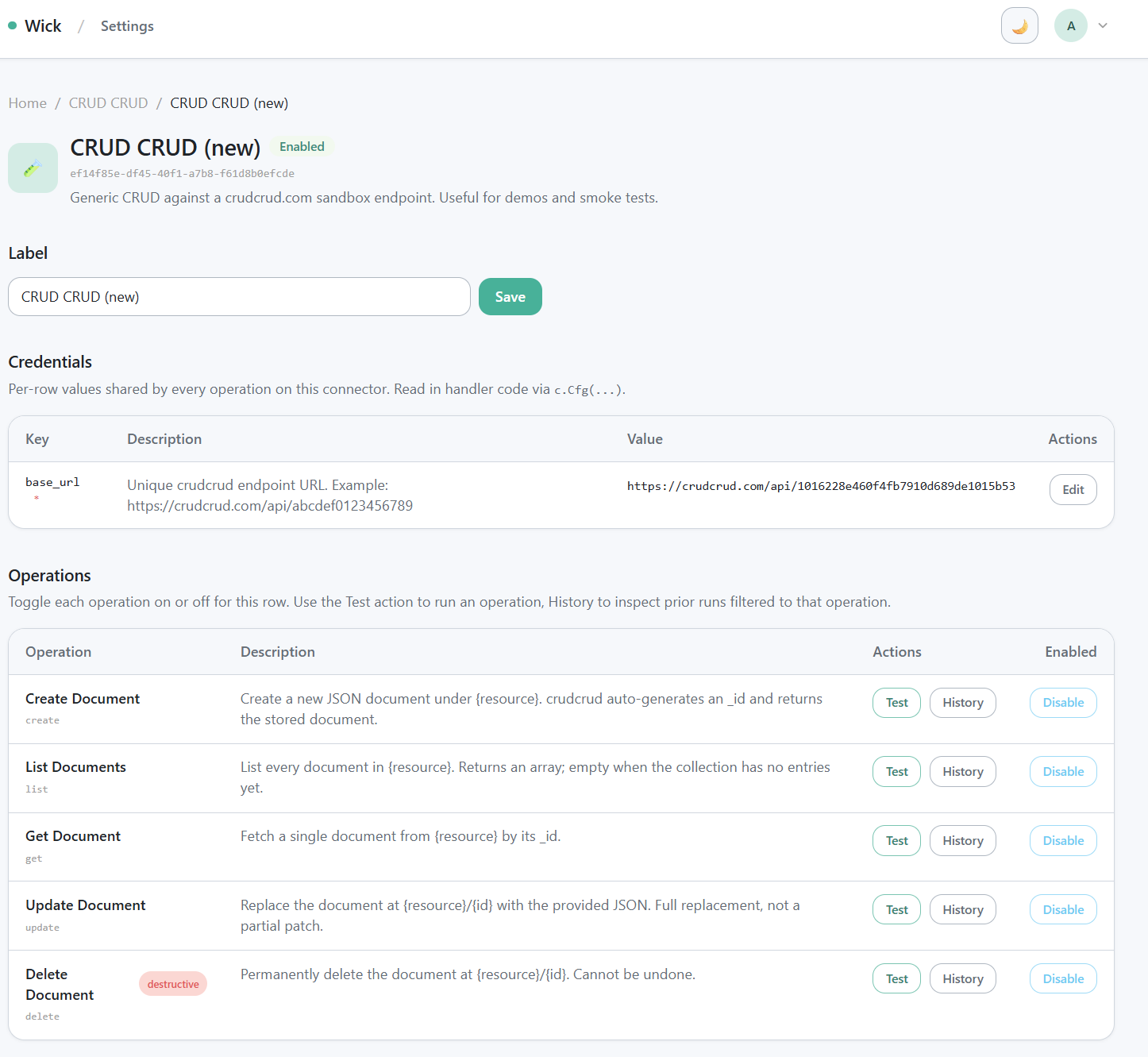
/manager/connectors/{key}/{id} detail page — identity, action bar, label form, credentials, operations table.
/manager/connectors/{key}/{id} is the per-row settings page. Seven sections:
- Identity — label, status badge, opaque row ID.
- Top actions — History, Duplicate, Disable/Enable, Delete.
- Label form — rename without redeploying.
- AI description — a free-text field, off by default (toggle to show it), that an admin can fill with extra guidance for this instance: when to use it, team notes, account-specific constraints. It auto-saves as you type (debounced, no Save button) and is stored on
entity.Connector.Description, separate from the module's ownMeta.Description. See below. - Credentials — auto-rendered from your
Configsstruct viaentity.StructToConfigs. For OAuth connectors, also shows the Connect Account button and any connected accounts. - Access Policy — five flags controlling who can configure, connect, or see OAuth accounts. Editable by admins or the instance owner (creator);
AllowOthersConfigureusers are intentionally excluded here because the policy controls who gets that grant:Enable SSO— turns on the OAuth Connect Account flow for this instance.Multi-account— each user connect creates a new account entry (vs replacing the single token).Others can see connected accounts— off by default: every connected account is private to the wick user who connected it, unless an admin shares that one account with a tag (/admin/connectorslists each instance's connected accounts underneath it, each with its own tag picker; tags live intool_tagson/connector-accounts/{accountID}). Each user'swick_listshows the connector plus their own account, the detail page lists only their own, and running an op as an account somebody else connected is refused. Admins and the instance owner always see the whole pool. Turn it on to go back to a shared pool where anyone with tag access can see and run as every account. Stored onentity.Connector.AllowOthersSeeAccounts; the rule lives inconnectors.AccountVisibleTo.Allow others to configure— non-admin users with tag access may edit credentials.Allow others to connect SSO— non-admin users with tag access may initiate the OAuth flow.
- Operations — operations grouped into named category cards (one card per
connector.Catsection: title, description, op count, per-card Enable/Disable all). A sticky "Sections" sidebar on the right lists every category; clicking a row jumps to that card. A global search box filters across all categories (cards with no match hide). Each op row carries:[Test]link → opens the test panel (/test?op=<key>)[History]link → opens the audit log filtered to that opEnable / Disabletoggle — toggle individual ops. Destructive ops ship enabled; disable here if you want to restrict them. An op declared withOpConfigOnly(...)(backs a config-form widget, e.g. anhtml=<op>picker or status card) shows a "Config only" badge instead of the toggle — it's not an agent tool and is excluded from the "Operations N" count, but admins can still run it from[Test].SystemDisabledbadge (advisory) — shown when the health check flagged a missing permission, but the op can still be called ifEnabled=true.
AI description
Beyond the module's own Meta.Description (written once, in code, shared by every row), an admin can attach a per-instance description to a specific connector row — useful when the same connector type is spawned multiple times for different accounts/teams and each needs its own "when to use this one" guidance.
- Edited on the detail page's AI description section (see above); saves automatically.
- Stored on
entity.Connector.Description—Service.SetDescription/Repo.SetDescription,POST /manager/api/connectors/{key}/{id}/description({"description":"..."}, empty clears it). - Surfaced to the LLM two ways: (1) as a distinct
operator_notefield in thewick_list/wick_search/wick_getmeta-tools — separate from the connector's built-indescription, so the agent can tell an operator instruction from product copy (omitted when blank); (2) through thewickmanagerconnector'sconnector_list/connector_getops, where the instance text is appended to the module'sMeta.Description(base description, blank line, then the instance note). See Wick Manager. - Purely additive — it does not change what any operation does, only what an LLM (or admin) reads about the instance as a whole.
Test panel (Postman-style)
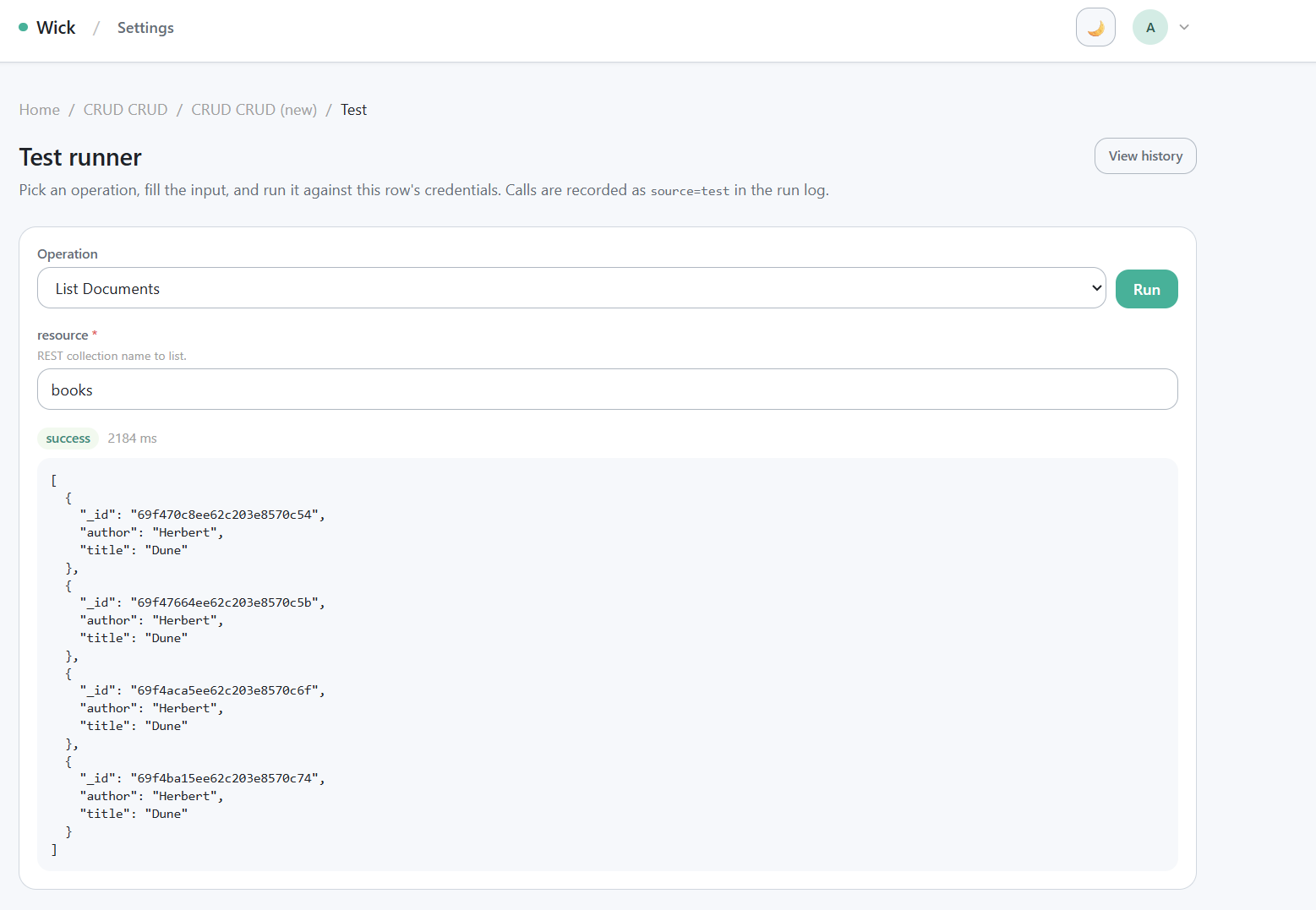
/manager/connectors/{key}/{id}/test?op=... Postman-style runner — input form + Run button + success result panel.
GET /manager/connectors/{key}/{id}/test?op=<op_key> is the in-app runner. It uses the exact same code path as the MCP tools/call — verify behavior end-to-end without leaving the browser.
- URL-synced operation dropdown — switching the operation rewrites
?op=...viahistory.replaceState. Refresh and back-button preserve the choice; deep links from the detail page can pre-select. - Prefill from history — the History page's "Retry" link points at
/test?op=<op>&prefill=<run_id>. The handler decodes the prior run's input and pre-fills every matching input field. You review and edit before clicking Run — never auto-replay. - Every Run writes a row to
connector_runs(source =test).
History page
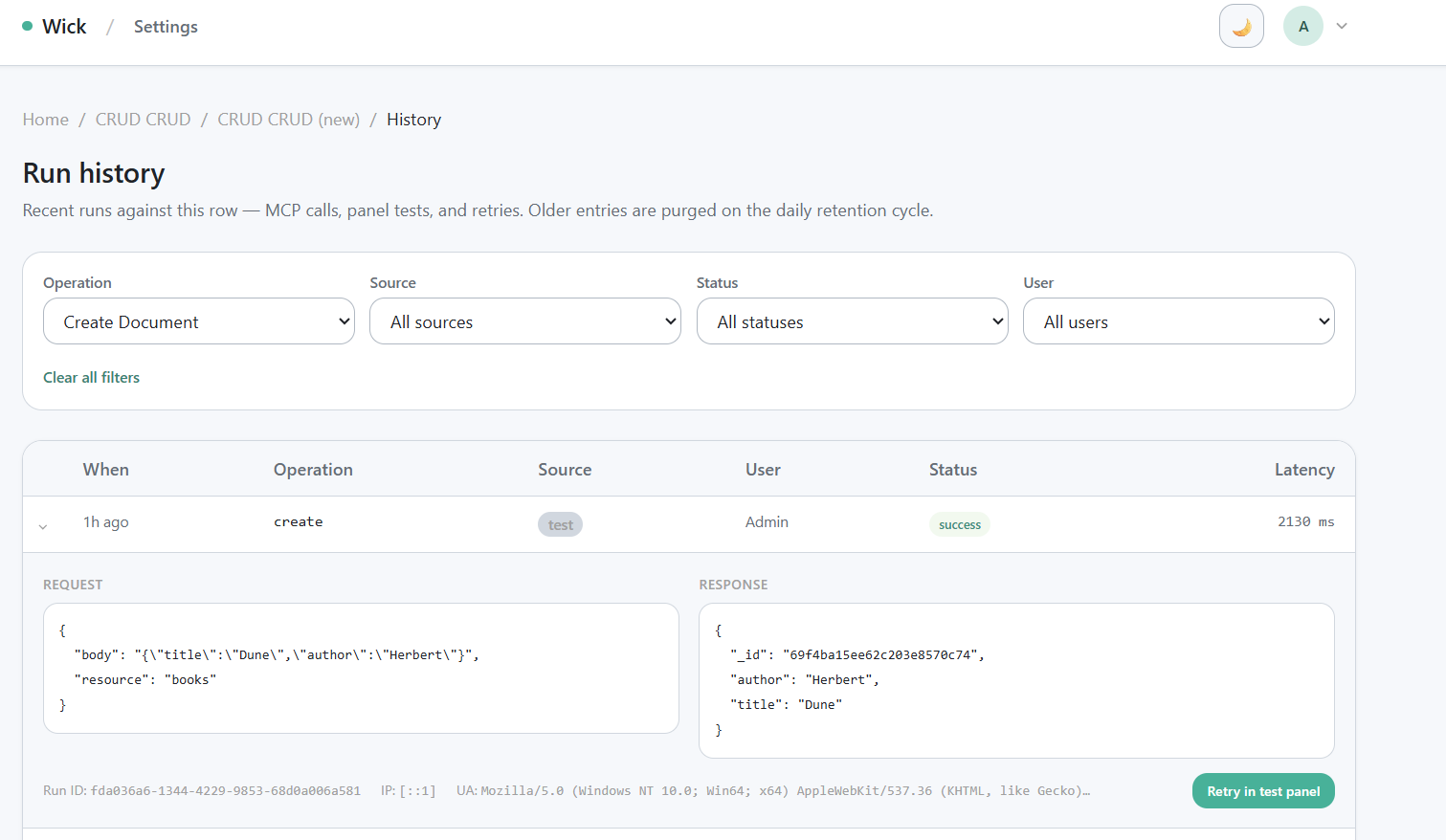
/manager/connectors/{key}/{id}/history audit log — filter chips + table + expanded row showing Request/Response JSON + Retry link.
GET /manager/connectors/{key}/{id}/history?op=...&source=...&status=...&user=... is a paginated audit log.
- Filter chips are URL-driven — every change rewrites the query string. Links are shareable; refresh preserves filters.
- 10 rows per page, server-side pagination.
- The User column resolves IDs to display names in batch (no N+1 queries).
- Click a row to expand inline — full Request JSON, Response JSON, run ID, IP, user agent, and HTTP status, no extra round trip.
- The expanded panel includes a "Retry in test panel" link that navigates to the test page with the prior input prefilled. Manual replay only — wick deliberately does not offer a one-click POST replay so you can review and adjust before re-running.
- A row still
runningshows a ✕ Cancel button. Cancelling aborts the op in place (its context is cancelled, so the underlying connector call unwinds) and the row settles to a Cancelled status — a distinct, neutral state fromError, since the op didn't fail on its own. A run can also be cancelled from the agent conversation UI, where a running tool call shows the same cancel control on its card (the agent turn keeps going; only that one op is aborted). - A run can no longer stay stuck
runningforever: besides the boot-time reset and the per-op server timeout, a background job periodically reclaims any row stillrunningwell past every legitimate op's ceiling, flipping it toCancelledso the history/tracer UI never shows a permanently-running row.
Sharing connectors with tags
Every connector row is private by default at the transport level — the /mcp endpoint always requires a bearer token; there is no anonymous access. Within authenticated users, visibility is gated by tag filter (the same mechanism Tools and Jobs use):
- A row with 0 filter tags is visible to every approved user.
- A row with ≥1 filter tag is visible only to users who carry at least one matching tag.
- Admins bypass the filter — they always see every row.
Tag strings are arbitrary and admin-defined. Conventional prefixes like team:platform, env:prod, user:alice@example.com are just naming conventions, not enforced by code.
When the user asks for a "private" connector:
- If they mean "not exposed to anonymous users" — that's already the default, no action needed.
- If they mean "only people on team X" — add a filter tag. Apply the tag both to the connector row (at
/manager/connectors/{key}/{id}) and to the team members' user records (at/admin/users).
The fixed MCP tools wick_list, wick_get, and wick_execute re-check tag visibility on every call — they never trust a list-time cache. Removing a user's tag takes effect on the next call.
Verifying your connector
After registering and filling credentials:
- Compile and boot:bash
wick dev - Smoke test in the browser:
- Open
/manager/connectors/{key}— your auto-seeded row appears. - Open the row, fill in
Configs, save. - Open
/test?op=<op>, fill input, click Run, confirm a success result.
- Open
- Check the audit log:
- Open
/history, find the run row. - Expand to confirm Request/Response JSON, latency, and run ID.
- Open
- Smoke test from MCP (optional but recommended):
- Generate a Personal Access Token at
/profile/tokens. - Add to your Claude Desktop config — see the MCP guide for the snippet.
- Restart Claude Desktop, ask it to call your connector.
- Generate a Personal Access Token at
Reference
- Public API:
pkg/connector—Meta,Module,Category,Cat,Operation,Op,OpDestructive,ExecuteFunc,Ctx,Module.AllOps(),Module.CategoryOf() - Canonical example:
connectors/crudcrud/— three-file split (connector.go+service.go+repo.go) - Built-in connectors shipped with wick (httprest, github, slack, wickmanager, workflow, crudcrud) — see Built-in Connectors
- MCP transport: MCP for LLMs
- Auth modes: Access Tokens (PAT), OAuth Connections
- Audit retention: Connector Runs Purge
- Workflows: a
connectornode calls one operation on an existing row through the same code path aswick_execute— see Workflows ▶ connector node.