
MCP for LLMs
Wick speaks the Model Context Protocol so any MCP-aware LLM client — Claude.ai, Claude Desktop, Cursor, custom agents — can call your connectors with structured input and output. There is no glue code on your side: register a connector, generate a token, paste a URL.
Why MCP
Traditional REST integrations require the LLM (or the prompt author) to know URLs, headers, and response shapes upfront. MCP standardizes the discovery + invocation handshake so the LLM negotiates capabilities at runtime: the server advertises a tool list and JSON Schema; the client picks a tool, supplies typed arguments, and receives a typed response. Auth is bearer-token only — no per-request signing dance.
Wick layers two more wins on top:
- Per-call audit — every invocation writes a row to
connector_runswith input, output, latency, IP, and user. See the history page on a connector row. - Tag-filtered visibility — a user only sees connector rows whose tags match. Sharing a row across teammates is
/admin/users+/admin/connectorswork, not code.
Endpoint
POST /mcp                                   JSON-RPC 2.0 over Streamable HTTP
GET  /.well-known/oauth-protected-resource  RFC 9728 metadata
GET  /.well-known/oauth-authorization-server RFC 8414 metadata
POST /mcp accepts both JSON and Streamable HTTP responses:
Request Accept | Response | Use case |
|---|---|---|
application/json (default) | Single JSON-RPC frame | 90% of tool calls |
text/event-stream | SSE — notifications/progress frames + final result | Long-running ops with progress events |
Heartbeat :keepalive frames every 15 seconds keep reverse proxies from reaping idle SSE connections.
Meta-tool pattern
Wick does not advertise N×M static tools (one entry per connector × operation). It advertises a fixed set of meta-tools:
| Tool | Annotation | Purpose |
|---|---|---|
wick_list | readOnlyHint | List every connector instance and connected OAuth account visible to the caller. Each entry has id, connector (label), description, total_tools, status, kind, and parent_id. Pass session_id to also include this session's workspace connectors (sw_… entries) and a session_config_bases array (connectors that can be cloned into a session workspace but haven't been added yet). |
wick_search | readOnlyHint | Substring search over label, name, description. Pass session_id to also match this session's workspace connectors. |
wick_get | readOnlyHint | Drill into a connector one level at a time via an optional selector argument. Pass only id to list the connector's categories; add selector=<category title> to list that category's operations (no schemas yet); add selector=<op key> to get that one op's input_schema. Flat connectors with no named categories skip straight to listing ops. For session-workspace connectors (sw_… id), also pass session_id as a separate argument. |
wick_execute | destructiveHint | Run an operation by tool_id + params, or run a batch of operations in one call by passing a calls array. See Batch execution. Composite tool IDs (conn:…/op@accountID) inject the account token automatically. |
wick_info | readOnlyHint | Return server version and build info |
wick_me | readOnlyHint | Who is this connection authenticated as: user_id, name, email, role, is_admin, is_owner, approved, filter_tag_ids, plus is_system / is_local_cli. Resolved server-side from the caller's credential. See Caller identity. |
wick_encrypt | readOnlyHint | Redirect to the in-app encrypt UI — no crypto over MCP. See Encrypted credentials |
wick_decrypt | readOnlyHint | Redirect to the in-app decrypt UI — no crypto over MCP |
wick_session_info | readOnlyHint | Read the active session's metadata: session_id, title, title_custom, origin, status, project_id. Used by the agent to decide whether to set a title. |
wick_set_title | idempotentHint | Set the session's sidebar title and mark it as custom so the auto-derived first-message label never overwrites it. Title is truncated to 60 characters. |
wick_session_workspace | — | Spin up throwaway connector instances scoped to one session (clone a base connector, point it at staging, use a different key). The agent creates blank instances; the user fills the config in a UI form; the agent never sees the values. Instances appear in wick_list for that session only and die with it. See Session workspace. |
The selector argument accepts either a category title (from a prior id-only response) or an op key (from a category listing). The category and op_key argument names are accepted as aliases for selector — use whichever reads naturally in your tool call. An unknown selector returns an error listing what to try instead.
Why not a static list?
- Dynamic instances — adding or removing a connector row in the admin UI must not invalidate the LLM client's cached tool list. With a small fixed set of meta-tools, the cache is always valid.
- Token economy —
wick_listdoes not return per-opinput_schema. The LLM only pays the schema cost when it commits to calling a specific op viawick_get. - Scale — a server with hundreds of connectors still has a compact
tools/listresponse.
Wick Manager top-level tools
The Wick Manager connector is a special case. Its operations are surfaced directly in tools/list as wick_manager_<op> tools — for example wick_manager_app_list, wick_manager_job_run_now, wick_manager_connector_list. The LLM can call them without the wick_list → wick_get → wick_execute discovery cycle.
wick_manager_app_list          → list all app-level configuration variables
wick_manager_job_run_now       → trigger an out-of-cycle job run
wick_manager_connector_list    → list connector instances visible to the caller
… (one entry per enabled wickmanager op)
Because these tools appear directly, wickmanager is excluded from wick_list and wick_search to avoid double-exposure.
Visibility follows the same rules as every other connector: the caller only sees wick_manager_* tools when the wickmanager row is visible to their user (tag match or admin). Per-op access gates are unchanged — each call routes through wick_execute internally and re-validates the per-op enable state.
The wick_manager_* tools work over both the stdio transport and the Streamable HTTP/SSE transport.
Tool ID format
Standard (connector-level):
conn:{connector_id}/{op_key}Account-scoped (personal OAuth identity):
conn:{connector_id}/{op_key}@{account_id}UUID-based, opaque, stable across admin label renames. The conn: prefix is reserved for future module classes (e.g. prompt: for prompt templates). When wick_get is called with a composite connectorID/accountID id (from a kind="account" entry in wick_list), the returned tool_id values in the op listing and schema levels carry the @accountID suffix. Passing such a tool_id to wick_execute automatically injects that account's OAuth token and enforces its per-account disabled-op list.
Typical LLM flow
The three wick_get levels keep the LLM's context from ballooning — only the final level carries an input_schema:
# Level 1 — category list (no ops, no schemas)
wick_get({id: "conn-uuid"})
→ { categories: [{ category, description, total_tools }, …] }

# Level 2 — op list for one category (no schemas)
wick_get({id: "conn-uuid", selector: "Calendar"})
→ { tools: [{ tool_id, name, description, destructive }, …] }

# Level 3 — single op with schema
wick_get({id: "conn-uuid", selector: "calendar_create_event"})
→ { tools: [{ tool_id, name, description, destructive, input_schema }] }
For a flat connector with no named categories, level 1 falls through to an op list directly — skip straight to level 3 with an op key.
Shortcut when the LLM already knows the op key (e.g. from a prior wick_search hit):
wick_search({query: "loki query"})                             → matched tool_id
wick_get({id: "conn-uuid", selector: "loki_query_range"})      → input_schema
wick_execute({tool_id, params: {...}})                          → result
Multi-identity: connector vs account
wick_list returns two kinds of entries:
kind | id format | What it represents |
|---|---|---|
"connector" | {connectorID} | The shared instance — bot token, API key, or service account |
"account" | {connectorID}/{accountID} | A personal OAuth account connected to that instance |
When multiple users have connected personal accounts to one instance, the LLM sees one "connector" entry (shared identity) plus one "account" entry per user. Use kind to decide which identity to run as: "connector" for shared/bot credentials, "account" for personal identity. Pass the composite id to wick_get to get account-scoped tool_id values, then call wick_execute as usual — the server injects the right token automatically.
Auth check on every call
wick_execute and wick_get re-validate IsVisibleTo(connector_id, user_tag_ids, is_admin) on every call — they never trust a list-time cache. The connector_operations enable state is also re-checked. Removing a user's tag or disabling an op takes effect on the very next call.
Batch execution
wick_execute accepts either a single tool call or a batch in one round-trip. Pass a calls array instead of tool_id/params at the top level:
{
  "calls": [
    { "tool_id": "conn:uuid/op_a", "params": { "x": 1 } },
    { "tool_id": "conn:uuid/op_b", "params": { "y": 2 } },
    { "tool_id": "conn:uuid/op_c", "params": {}, "session_id": "sw_..." }
  ],
  "timeout_ms": 60000
}
Calls run in parallel, independently — one failing or timing out never stops the rest. The response is always a per-call result array (never isError unless the request itself is malformed):
{
  "results": [
    { "index": 0, "tool_id": "conn:uuid/op_a", "ok": true,  "result": {…},            "duration_ms": 210 },
    { "index": 1, "tool_id": "conn:uuid/op_b", "ok": false, "error": "not found",     "duration_ms": 85  },
    { "index": 2, "tool_id": "conn:uuid/op_c", "ok": false, "timed_out": true,        "duration_ms": 60000 }
  ],
  "ok_count": 1,
  "error_count": 1,
  "timed_out_count": 1
}| Field | Description |
|---|---|
index | Position in the original calls array (0-based). |
ok | true when the call succeeded. |
result | Raw response JSON from the connector op. Present only when ok: true. |
error | Error message string. Present only when ok: false and not a timeout. |
timed_out | true when the per-call deadline expired. |
duration_ms | Wall time for that call. |
ok_count / error_count / timed_out_count | Totals for quick scanning. |
Limits and timeouts:
| Parameter | Default | Max |
|---|---|---|
calls length | — | 100 per request |
timeout_ms | 180 000 (3 min) | 300 000 (5 min) |
| Server concurrency | — | 5 (fixed, not configurable) |
timeout_ms sets a per-call deadline, not a batch deadline. The server bounds how many calls run at once; you do not need to tune concurrency.
Always call wick_get to fetch each op's input_schema before building the batch — the same prerequisite as single-call mode. Inspect each entry's ok field rather than treating the whole batch as pass/fail.
Encrypted credentials
Wick wraps sensitive plaintext in a wick_enc_<base64url> token before the response leaves the server. The LLM carries the token forward into the next tool call; wick decrypts it before ExecuteFunc runs. The plaintext never appears in the LLM's context window or in the audit log. Three sources are masked, deduped: every Configs/Input field tagged secret, every plaintext produced by decrypting an incoming wick_enc_ token (regardless of tag — the LLM treats tokens as opaque and may pass them into any field), and every value the connector explicitly handed to c.Mask / c.MaskIgnoreCase mid-call.
Per-user keys (HKDF(master_key, salt=user_uuid, info="wick-enc")) mean a token issued for user A cannot be decrypted under user B's session — replays across users fail loudly.
wick_execute's tool description tells the LLM how to handle these tokens:
Values prefixed with "wick_enc_" are valid credentials managed by the server. Use them as-is wherever a value is needed — pass them through into params, return them unchanged in your response, and never alter, decode, or omit them.
When a user explicitly asks for the plaintext behind a token (or wants to mint a new one to paste into a config field), two redirect tools point them at the in-app UI:
| Tool | Returns |
|---|---|
wick_encrypt | { "url": "https://<host>/tools/encfields", "message": "..." } |
wick_decrypt | { "url": "https://<host>/tools/encfields/decrypt", "message": "..." } |
The crypto is never run over MCP — running it inline would defeat the purpose by putting plaintext (encrypt) or the user-revealed value (decrypt) into the LLM's context window. The user opens the URL, logs in, pastes the value, and copies the result.
For the full mechanism — secret tag semantics, c.Mask / c.MaskIgnoreCase for dynamic responses, key rotation, WICK_ENC_KEY / WICK_ENC_DISABLE env vars — see the Encrypted Fields reference.
Auth modes
The /mcp endpoint accepts two bearer-token formats, dispatched by prefix:
| Mode | Wire format | Use when |
|---|---|---|
| Personal Access Token | wick_pat_<32hex> | The client cannot speak the OAuth dance — Claude Desktop, Cursor, cURL, custom CLIs. See Access Tokens. |
| OAuth 2.1 access token | wick_oat_<32hex> | The client supports OAuth (Claude.ai, web-based clients). See OAuth Connections. |
Both formats are opaque (not JWT) and stored hashed (SHA-256). A DB leak does not expose tokens. Plaintext only crosses the wire at issue time:
- PAT: rendered once at
/profile/tokensafter the user clicks Create. - OAuth: returned in the
/oauth/tokenresponse body to the client.
Install snippets
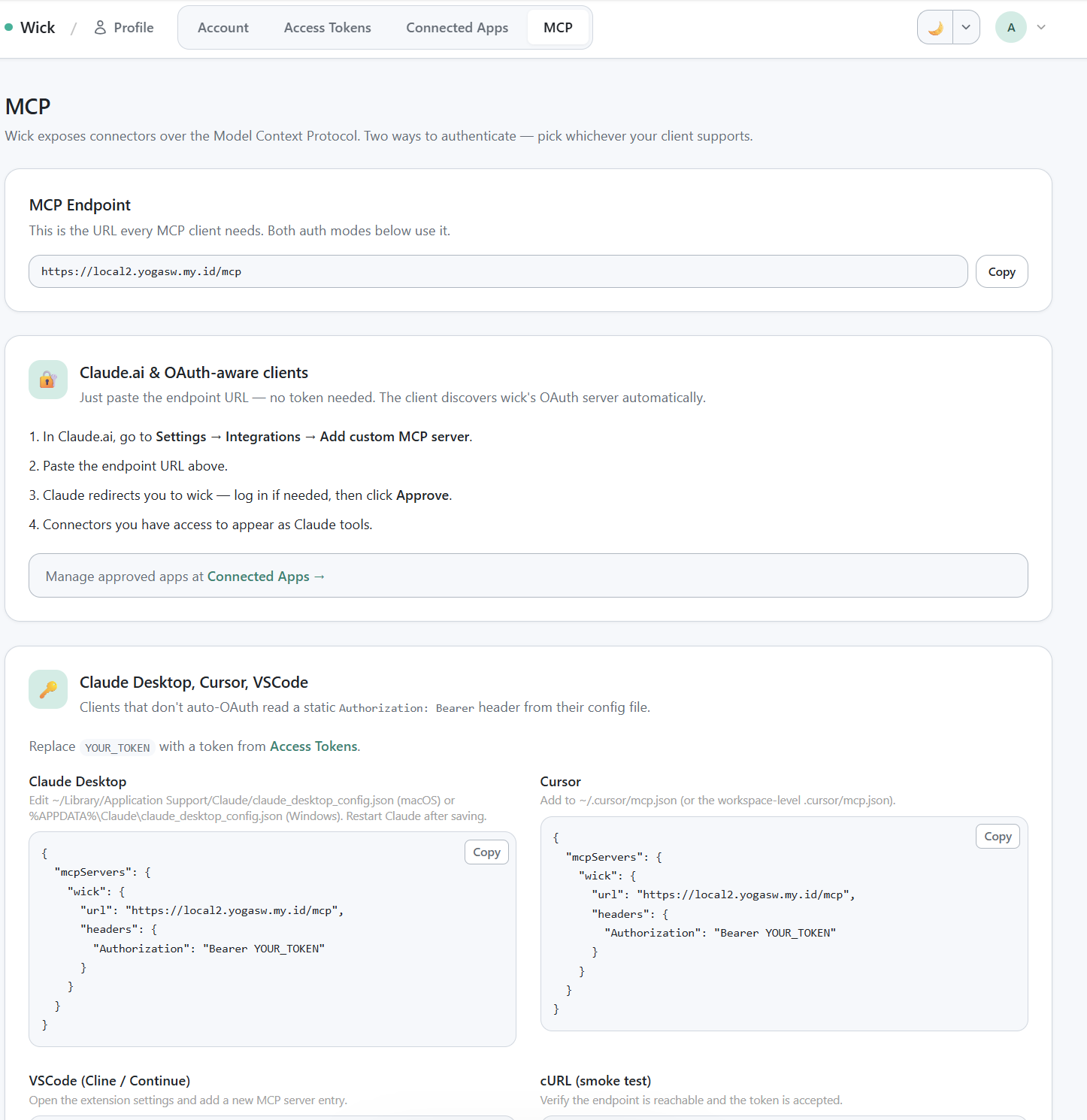
/profile/mcp install snippets — OAuth section + Bearer section with all 4 ready-to-paste snippets.
The in-app /profile/mcp page shows the URL and four install snippets ready to copy. Below is the same content for reference.
Claude.ai (OAuth)
Paste this URL into Claude.ai's MCP server settings:
https://<your-wick-host>/mcpClaude.ai will:
POST /oauth/registerto obtain aclient_id(Dynamic Client Registration, RFC 7591 — no pre-shared secret).- Redirect the browser through
/oauth/authorizefor consent. - Exchange the code at
/oauth/tokenfor an access + refresh token. - Cache the tokens; refresh on its own as needed.
If the user is not logged in to wick when the redirect lands, wick captures the destination, bounces through /auth/login (password or Google SSO), then resumes the consent flow.
Claude Desktop / Cursor / VSCode (Bearer)
Generate a Personal Access Token at /profile/tokens, then paste it into the client config.
Claude Desktop (~/Library/Application Support/Claude/claude_desktop_config.json on macOS, %APPDATA%\Claude\claude_desktop_config.json on Windows):
{
  "mcpServers": {
    "wick": {
      "command": "npx",
      "args": ["-y", "mcp-remote", "https://<your-wick-host>/mcp",
               "--header", "Authorization: Bearer ${WICK_PAT}"],
      "env": {
        "WICK_PAT": "wick_pat_xxxxxxxxxxxxxxxxxxxxxxxxxxxxxxxx"
      }
    }
  }
}
Cursor (~/.cursor/mcp.json):
{
  "mcpServers": {
    "wick": {
      "url": "https://<your-wick-host>/mcp",
      "headers": {
        "Authorization": "Bearer wick_pat_xxxxxxxxxxxxxxxxxxxxxxxxxxxxxxxx"
      }
    }
  }
}
VSCode (settings.json):
{
  "mcp.servers": {
    "wick": {
      "url": "https://<your-wick-host>/mcp",
      "headers": {
        "Authorization": "Bearer wick_pat_xxxxxxxxxxxxxxxxxxxxxxxxxxxxxxxx"
      }
    }
  }
}
cURL
curl -X POST https://<your-wick-host>/mcp \
  -H "Authorization: Bearer wick_pat_xxxxxxxxxxxxxxxxxxxxxxxxxxxxxxxx" \
  -H "Content-Type: application/json" \
  -H "Accept: application/json" \
  -d '{"jsonrpc":"2.0","method":"tools/list","id":1}'
Expect a response containing the wick_* meta-tools (plus any wick_manager_* tools if the wickmanager connector is visible to your token's user). Then call wick_list to enumerate the connector rows visible to your token's user.
curl -X POST https://<your-wick-host>/mcp \
  -H "Authorization: Bearer wick_pat_xxxxxxxxxxxxxxxxxxxxxxxxxxxxxxxx" \
  -H "Content-Type: application/json" \
  -d '{"jsonrpc":"2.0","method":"tools/call","id":2,
       "params":{"name":"wick_list","arguments":{}}}'
Local MCP (stdio)
Wick ships a built-in stdio transport so any MCP client that spawns a child process — Claude Desktop, Cursor, Gemini CLI, Codex CLI, Claude Code — can connect directly to your local project without a hosted server or PAT.
The local server runs as a synthetic local admin: all connectors are visible, no auth middleware, no token required.
Commands
wick mcp serve
Starts the MCP JSON-RPC server over stdin/stdout. Normally invoked automatically by the client; you rarely run this by hand.
wick mcp serve [--mode auto|dev|build|rebuild]| Flag | Default | Description |
|---|---|---|
--mode | auto | Build mode (see table below) |
--project | (cwd) | Project root — set automatically by mcp install, not needed when running from the project dir |
Build modes:
| Mode | Behavior |
|---|---|
auto | Rebuild only when HEAD commit changed or any .go file is newer than binary |
dev | go run . — always recompiles; no binary cache. Good while actively developing connectors |
build | Build once if binary missing, reuse otherwise |
rebuild | Always force a full rebuild |
wick mcp config
Print the ready-to-paste mcpServers JSON snippet for any client, plus show config file locations for all supported clients.
wick mcp config [--name <server-name>] [--mode auto|dev|build|rebuild]wick mcp install
Write the mcpServers entry directly into the target client's config file.
wick mcp install [--client <target>] [--name <server-name>] [--mode auto|dev|build|rebuild]--client | Config file written |
|---|---|
claude | Claude Desktop — claude_desktop_config.json |
cursor | Cursor IDE — settings.json |
gemini | Gemini CLI — ~/.gemini/settings.json |
codex | Codex CLI — ~/.codex/config.toml |
claude-code | Claude Code — ~/.claude.json |
all | All five targets |
Default --client is claude.
Wiring Claude Code
From the project root:
wick mcp install --client claude-code
# ✓ Claude Code
#   ~/.claude.json
Or for dev mode (always recompiles — no stale binary surprises):
wick mcp install --client claude-code --mode devThe merged entry inside ~/.claude.json:
{
  "mcpServers": {
    "myproject": {
      "command": "go",
      "args": ["run", ".", "mcp", "serve"],
      "cwd": "/path/to/myproject"
    }
  }
}
For auto / build / rebuild modes the entry uses the compiled wick binary with --project so the client can spawn it from any working directory:
{
  "mcpServers": {
    "myproject": {
      "command": "/path/to/wick",
      "args": ["mcp", "serve", "--mode", "auto", "--project", "/path/to/myproject"]
    }
  }
}
After saving, restart Claude Code (or reload MCP servers via /mcp). The wick_* meta-tools appear in Claude Code's tool list with no token required.
Workflow & agent access (loopback)
When a workflow agent node (or a chat agent) spawns Claude as a subprocess, wick points it at the already-running MCP server over loopback (http://127.0.0.1:<PORT>/mcp) so it can use connectors without cold-starting a separate stdio mcp serve per run. This is automatic — no PAT, no manual config:
- wick mints a random per-boot internal token (in-memory) and injects it into the spawned agent's MCP config as the
Authorization: Bearer …header. - The agent connects over the full MCP Streamable HTTP transport:
POST /mcp(JSON-RPC),GET /mcp(the server→client SSE channel),DELETE /mcp(teardown). - The wick server merges with the user's own MCP servers (
~/.claude.json,.mcp.json). Isolation is not selectable: wick injects its own server per spawn carrying that caller's token, so--strict-mcp-configwould only drop the user's other servers, never restrict wick's tools. SetWICK_DISABLE_SHARED_MCPto turn the loopback injection off entirely (falling back to the user's stdio config).
If a spawned agent reports MCP servers are still connecting: wick and the wick_* tools never register, the loopback handshake isn't completing — confirm the server build is current and that GET /mcp returns 200 (a streaming text/event-stream), not 404/500.
End-to-end test from a fresh project
- Register a connector — the scaffolded template ships
connectors/crudcrud/. Confirm it's registered inmain.go. - Boot:
wick dev. Wick auto-seeds one row at/manager/connectors/crudcrud. - Fill credentials. For crudcrud, claim a sandbox URL at https://crudcrud.com and paste it into the row's
BaseURLfield. - Smoke test in-browser. Open the row, click
[Test]next to any operation, run, verify the result panel. - Generate a PAT. Visit
/profile/tokens, click Create, copy the token from the render-once banner. - Wire up Claude Desktop. Drop the snippet above into
claude_desktop_config.json, restart Claude Desktop.
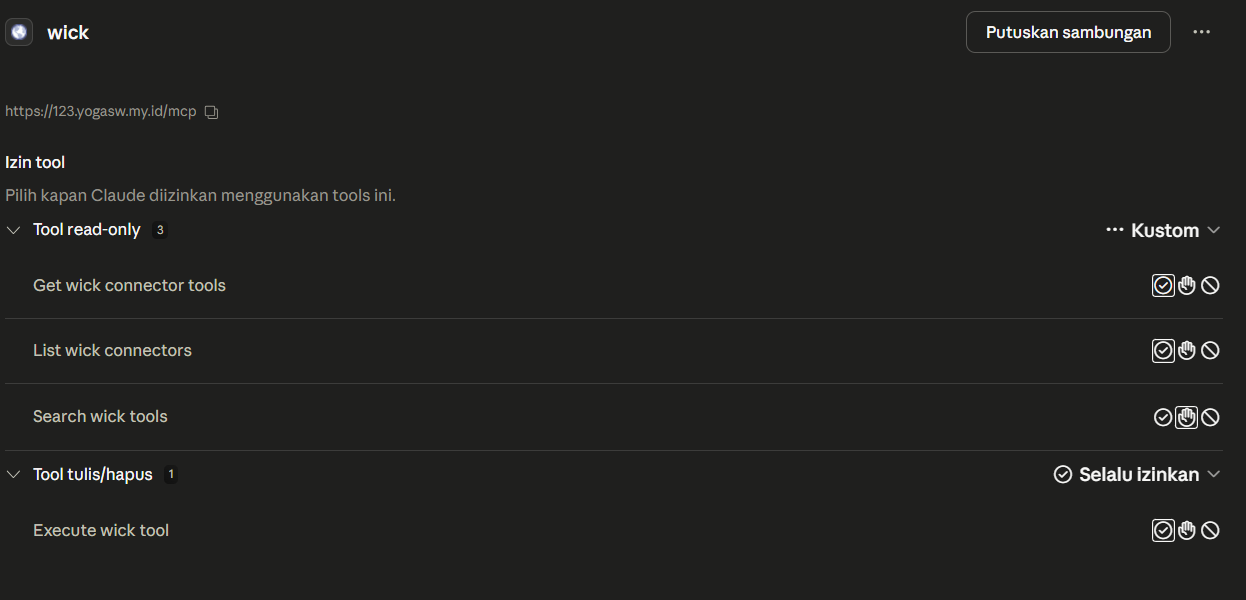
Claude Desktop Tools dialog showing the 4 wick_* tools registered after wiring a PAT.
- Try it. Ask Claude: "Use wick_list to see what connectors are available, then use wick_execute to list documents from the books resource on crudcrud."
Sessions
The Mcp-Session-Id header is generated on the first initialize call and held in-memory only — no DB row. On server restart, sessions are dropped; clients re-initialize and receive a fresh ID transparently. Auth (PAT or OAuth) is the load-bearing identity binding; the session ID is just a protocol marker.
Streaming
Default response is Content-Type: application/json — single round-trip. Wick switches to Content-Type: text/event-stream when:
- The client requested it via
Accept: text/event-stream. - The connector calls
c.ReportProgress(...)mid-execution.
Server-initiated push (GET /mcp) is not currently used. The tool list only changes when connector rows are added/removed in the admin UI; clients can re-fetch tools/list on demand, so notifications/tools/list_changed is not emitted.
Audit trail
Every MCP tools/call writes a row to connector_runs with:
connector_id,operation_key,user_idsource = "mcp"(vs"test"for the in-app panel,"retry"for prefill replays)- Request and response JSON (truncatable)
status,error_msg,latency_ms,http_status- Caller IP and User-Agent
parent_run_idfor retry lineage
The data backs the history page on each connector row. Retention is enforced by the Connector Runs Purge job — default 7 days.
wick_info
Returns the running server's version and build metadata. Useful for verifying which wick version is active without leaving the LLM context.
curl -X POST https://<your-wick-host>/mcp \
  -H "Authorization: Bearer wick_pat_xxxxxxxxxxxxxxxxxxxxxxxxxxxxxxxx" \
  -H "Content-Type: application/json" \
  -d '{"jsonrpc":"2.0","method":"tools/call","id":3,
       "params":{"name":"wick_info","arguments":{}}}'
Response:
{
  "wick_version": "v0.4.1",
  "server_build_time": "2026-05-02T10:03:30Z",
  "server_commit": "924efec"
}| Field | Description |
|---|---|
wick_version | Wick framework version — from the VERSION file at build time, or from the embedded Go module info when wick is used as a library dependency |
server_build_time | When this server binary was compiled (RFC 3339 UTC) |
server_commit | Short git commit hash of the server binary at build time |
wick_version is injected automatically by wick mcp serve — no ldflags needed in downstream projects. When wick is imported as a library (require github.com/yogasw/wick v1.x.x), the version is read from Go's embedded module build info at startup.
Session title tools
The wick-agent server exposes two tools that let the agent manage the session's sidebar title without touching the admin UI.
Caller identity
wick_me answers "which user am I acting for". The answer is resolved server-side from the credential the caller presented, so it is authoritative — an agent should use it rather than inferring the user from conversation text, which goes wrong after a handover or in a session someone else opened.
{
  "authenticated": true,
  "user_id": "…", "name": "Ada", "email": "ada@example.com",
  "role": "user", "is_admin": false, "is_owner": false, "approved": true,
  "filter_tag_ids": ["…"],
  "is_system": false, "is_local_cli": false, "identity_source": "token"
}
filter_tag_ids is included because those tags drive connector visibility: if a connector you expected is missing from wick_list, this is why — the agent can say so instead of insisting it should be there.
Three fields describe what kind of principal is on the other end:
| Field | Meaning |
|---|---|
authenticated: false | The transport carries no identity at all (local stdio with no principal). |
is_system: true | wick's synthetic principal — a cron run or system job, with no human attached. Do not report it as a person. |
is_local_cli: true | wick mcp serve (stdio), which binds to the first admin on the machine. See below. |
Agent spawns carry a per-session credential. Each spawn authenticates as the wick user who owns its session, so connector access and tag filtering apply to the human behind the conversation. A session with no owner (cron, system jobs, sessions predating ownership tracking) falls back to the synthetic admin principal.
stdio is admin by design. wick mcp serve has no request and no bearer token, so it binds to the first admin account on the box. This is deliberate: wick_enc_ tokens are keyed HKDF(masterKey, salt=user.ID), so a synthetic identity would mint tokens nobody can decrypt. is_local_cli marks it so an agent does not report a machine-local fallback as a verified human.
wick_session_info
Read-only. Returns the active session's metadata.
| Field | Type | Description |
|---|---|---|
session_id | string | Session identifier |
title | string | Current sidebar title (empty string until first message arrives) |
title_custom | bool | true when the title was set explicitly (by a human or by wick_set_title); false when it is still the auto-derived first-message label |
origin | string | Channel origin, e.g. slack, web, rest |
status | string | Session status, e.g. idle, busy |
project_id | string | Project the session belongs to, if any |
wick_set_title
Writes an explicit title to session.meta.label and sets title_custom = true. Once set, the auto-derived first-message label is permanently skipped for this session — even after a restart.
| Parameter | Required | Description |
|---|---|---|
session_id | yes | ID of the active wick agent session |
title | yes | Short human-readable title. Truncated to 60 characters. |
Returns the written session_id, title, and title_custom: true.
Auto-title behavior
When the agent system prompt is active (wick-agent server), the immutable system prompt instructs the agent to:
- Call
wick_session_infonear the start of a conversation. - If
title_customisfalse, derive a short title (3–7 words, ≤ 50 characters) from the user's request and callwick_set_title. - If
title_customis alreadytrue, leave the title alone.
This means sessions get a descriptive label automatically without prompting the user, while a title set manually by the user or by a previous agent turn is never clobbered.
Session workspace
wick_session_workspace lets an agent (or the user, via the session Workspace tab) spin up ephemeral connector instances scoped to one session: a private clone of a base connector — an httprest pointed at staging, a second API key — that behaves like a brand-new connector but lives and dies with the session. The saved connector rows are never touched.
Use it when the user wants to hit an endpoint or use a credential that only matters right now. Once added and configured, the instance's id shows in wick_list (pass the same session_id) and you wick_execute it like any connector. A session instance reports kind: "session" in the list response. When its config is incomplete its status is needs_setup_workspace (distinct from a saved connector's needs_setup) — direct the user to the Workspace tab, not the admin dashboard.
A session instance starts blank and is filled key-by-key as the user submits the fill modal. Any config field the base connector declares a default for (e.g. base_url) counts toward "ready" as soon as the instance exists, and falls back to that default at call time for both built-in and custom connectors — so you never need to explicitly re-set a config key just because its value happens to match the declared default.
The tool is human-driven for config. The agent creates blank instances and can open the fill modal, but the user types the values; secrets are encrypted server-side with a system-only master key, and the agent only ever learns which keys were filled, never the values. This keeps connector credentials and endpoints off the agent's context entirely.
Eligibility
A connector can be cloned into a session instance only when both hold:
- its module declares
AllowSessionConfig: true(capability, set in code / the custom-connector definition), and - the Allow per-session config override toggle is on for a visible instance (Manager → Connectors → {instance} → Per-session config).
Condition 2 defaults to on for any instance whose module has the capability — so eligible built-in connectors (e.g. httprest) are ready without a manual admin toggle. Admins can still turn a row off explicitly.
action=list returns the available_bases you may add. wick_list (with session_id) exposes the same set as session_config_bases so the agent can proactively offer to add one.
Actions
action | What it does |
|---|---|
list | This session's instances (id, status, missing keys) + available_bases. |
add | Create a blank instance from a base_key. By default pops the fill modal for the user right away (prompt: false to skip). |
duplicate | Copy an existing session instance (config and all) into a new one. |
configure | Reopen the fill modal so the user edits an instance's config. Blocks until submit (like ask_user). |
test | Verify setup — runs the base connector's health check, or pass operation (+ params) to run a real call. |
remove | Delete a session instance. |
The agent can neither read nor set config values directly — config is always entered by the user. Secret values are stored as system-only master tokens and decrypted only at execution time, never returned.
Parameters
| Parameter | Description |
|---|---|
session_id | The active session ID (required for every action) |
action | list / add / duplicate / configure / test / remove |
base_key | add: the base connector key to clone (from available_bases) |
connector_id | The session instance id (sw_…) for duplicate / configure / test / remove |
label | add / duplicate: optional human label |
prompt | add: open the fill modal immediately (default true) |
keys | add / configure: limit the fill modal to these keys |
operation, params | test: run this operation as the probe instead of the health check |
reason | add / configure: short text shown to the user explaining what the connector is for |
Workspace tab (UI)
The Workspace rail tab on the session slide-over is the user-facing equivalent of wick_session_workspace. It lists every session connector as a collapsible card, with a count badge that mirrors the number of active instances.
From the tab a user can:
- Add a session connector — pick a base from the dropdown; a blank instance is created immediately and its card expands so you can fill it in.
- Rename an instance inline — click the pencil icon next to the label, edit in place, confirm with Enter or blur.
- Edit config — expand a card, type values into the fields. Only changed fields are marked dirty. The Save button sends only the fields you actually edited; a Reset button (shown while edits are pending) reverts the card to its last-saved state. An autofilled-but-untouched field is never sent.
- Test — runs the connector's health check (or a named operation via
?operation=) against the config values currently on screen, not only what is saved. Live field values overlay the stored config for this probe only; nothing is persisted. This lets you verify a new key before committing. - Duplicate / Delete — copy an instance with its config, or remove it.
How instances run at execution time
When wick_execute (or wick_get) is called with a session_id and a sw_… connector id, the server resolves the instance from sessions/<id>/workspace.json, clones the base module, and runs against the instance's own config — no DB row, no tag visibility (the session itself is the authorization scope). Secret values (master tokens) are decrypted just before the call and re-masked in the response.
Instances live only while the session is active. Once a session sits idle — no running/queued subprocess and no activity for the grace window (default 10 minutes) — its instances are auto-deleted, config (secrets and all) included. While the session is running or was recently active they stay alive on their own, so there is no manual expiry to manage. When an instance is reaped a tombstone is left: wick_session_workspace action=list returns it under deleted, and the session Config tab shows a greyed "deleted — re-create" card, so the agent and user know a connector they set up earlier is gone and must be recreated. A lightweight in-process reaper does the cleanup and stops itself when no instances remain.
The reap also records a [system] context turn on the session (naming what was removed, marked "context only — do not reply"). Because the session is idle by definition, this is buffered, not spawned: the agent reads it as leading context the next time the user messages, so it already knows the connector is gone before answering — no extra subprocess, no channel message.
Scheduling a future message
wick_schedule_message lets an agent inject a message into a session later — one-shot or recurring — without the workflow engine. Typical use: an agent schedules itself ("check back at 12:40") by passing its own session_id. See Scheduled Messages for the full action set (create / list / cancel / pause / resume / reschedule), the timing grammar (run_at / every / cron), and the owner+admin access model.
Reference
- MCP spec: https://modelcontextprotocol.io
- Streamable HTTP transport: https://spec.modelcontextprotocol.io/specification/2025-03-26/basic/transports/#streamable-http
- OAuth 2.1: Connections
- PAT: Access Tokens