
Connector Runs Purge
connector-runs-purge is a built-in System job that trims old rows from the connector_runs audit table. It ships enabled by default — you don't need to wire it up — and runs on a daily cron with a configurable retention window.
Why a purge job
Every MCP call, every in-app test panel run, and every retry writes one row to connector_runs with the full request and response JSON, latency, IP, and User-Agent. On a busy deployment this table can accumulate millions of rows in weeks. Without retention, it bloats the database and slows the history page queries.
The purge job is wick's answer: a small daily worker that does a single range delete of rows older than N days, backed by the standalone started_at index on connector_runs. Cheap even when the table is large.
Defaults
| Knob | Default | Editable from |
|---|---|---|
| Cron schedule | 30 9 * * * (09:30 daily) | /manager/jobs/connector-runs-purge |
| Retention window | 7 days | /manager/jobs/connector-runs-purge |
| Enabled | Yes (auto-enabled at boot) | Not editable — see "System tag" below |
Adjust retention or schedule
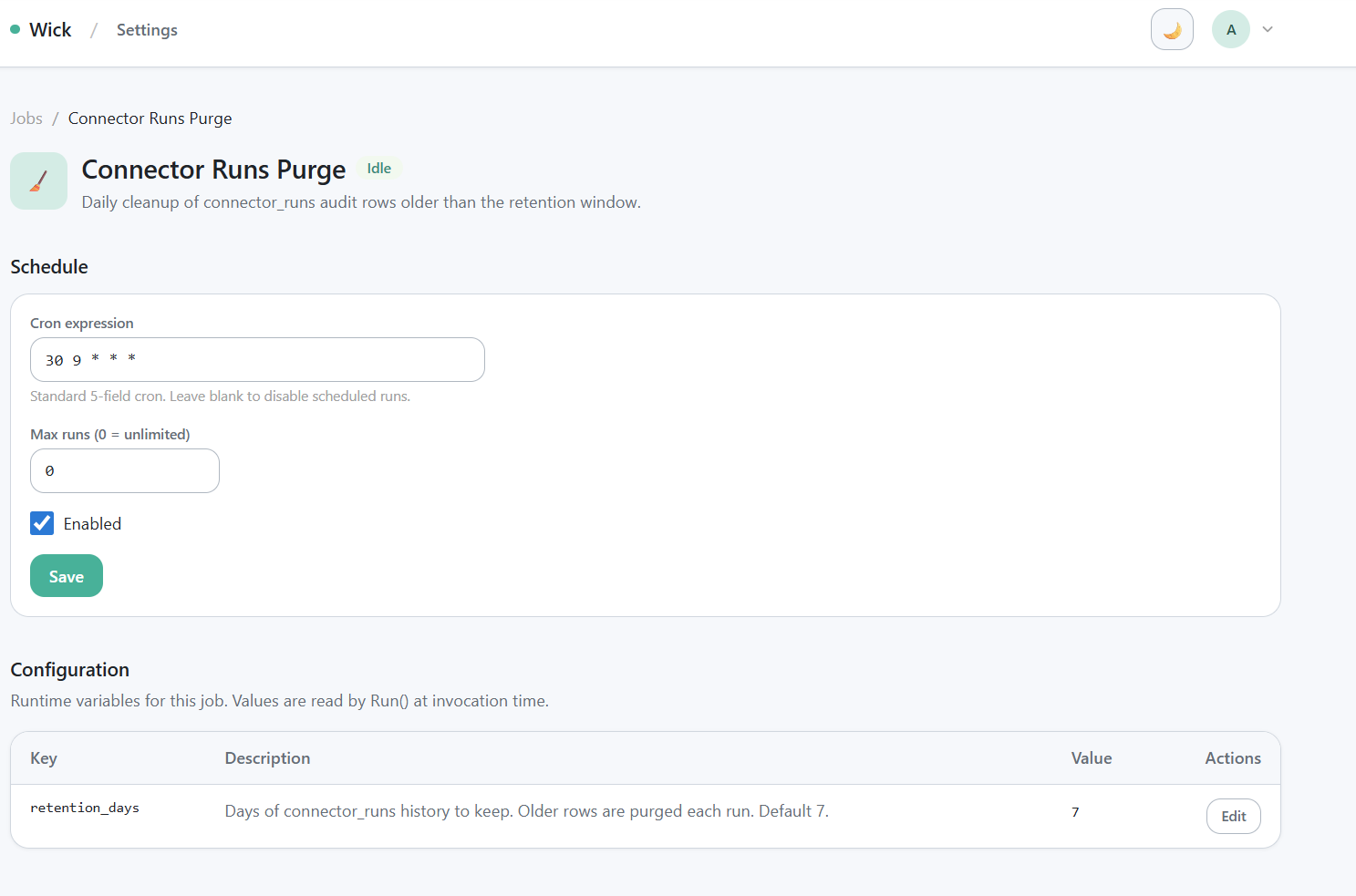
/manager/jobs/connector-runs-purge — cron field, retention_days field, save button.
Open /manager/jobs/connector-runs-purge:
- Schedule — edit the cron expression. Standard 5-field cron syntax; UTC timezone.
retention_days— integer. Rows whosestarted_atis older thannow - retention_daysare deleted on every tick.- Empty or non-positive values fall back to the in-code default of 7.
- Set to 30 if you need a month of audit history; set to 365 for a year.
- Trade-off: longer retention = larger table = slower history queries.
Changes take effect on the next tick — no restart needed.
Run-on-demand
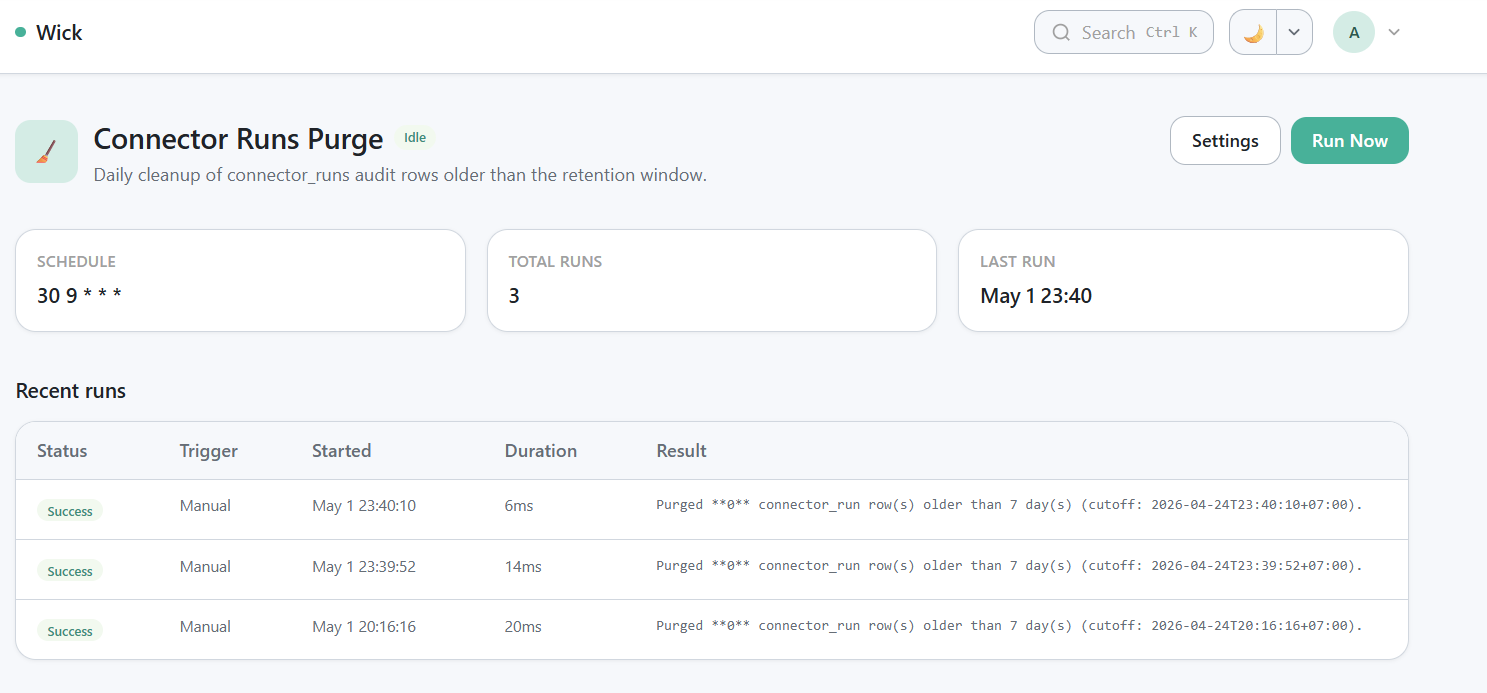
Run history row after "Run Now" — output like Purged N connector_run row(s) older than 7 day(s) (cutoff: ...).
Click Run Now on the operator page (/jobs/connector-runs-purge) to trigger an out-of-cycle purge. The result row in the history table records how many rows were deleted and the cutoff timestamp.
System tag — what makes this job special
connector-runs-purge is tagged System in wick's tag catalog. The System tag carries three flags simultaneously: IsSystem=true, IsFilter=true, IsGroup=true. Together they enforce four behaviors:
- Code-managed — admins cannot edit the System tag itself or detach it from this job at
/admin/tagsor/admin/jobs. The tag is owned by the wick source tree, not by the database. - Auto-enabled —
Meta.AutoEnable=truecauses wick to callForceEnableat every boot. You cannot disable the job from/admin/jobsor/manager/jobs— the Hide/Show button is hidden, the tag picker is disabled. - Hidden from non-admins — the IsFilter side of the tag means non-admin users do not see the job on
/jobs. Admins bypass the filter automatically. - Always scheduled — the worker
tickquery readsListEnabledJobsdirectly without going through tag filtering, so the schedule fires whether the row is visible in the UI or not.
Why all this lockdown? Disabling retention on a production deployment is a footgun — without retention the table grows unbounded and the history page eventually times out. Wick treats this job as part of the framework, not a user-managed concern.
If you have a hard requirement to disable retention entirely (legal hold, forensic snapshot), the workaround is to set retention_days to a very large value (e.g. 36500 for ~100 years) rather than disabling the job. Or — if you fork wick — remove the tags.System flag from the job's Meta and rebuild.
Manual purge (escape hatch)
If you need to purge without waiting for the daily tick and don't want to click "Run Now", a SQL fallback is always available:
-- SQLite or Postgres — same syntax
DELETE FROM connector_runs
WHERE started_at < datetime('now', '-7 days');  -- SQLite
-- or
DELETE FROM connector_runs
WHERE started_at < NOW() - INTERVAL '7 days';   -- Postgres
Use sparingly. The job's "Run Now" button is the supported path; SQL is for incidents only.
Troubleshooting
The job ran but no rows were deleted. That's normal for a fresh deployment — there's nothing older than the retention window yet.
The job is failing every run. Open the history detail row to read the error. Usual causes: database connection pool exhausted (very large delete on Postgres without started_at index), or the index was dropped by a manual migration. Re-create the index:
CREATE INDEX IF NOT EXISTS idx_connector_runs_started_at
  ON connector_runs (started_at);
I want to keep history forever. Set retention_days to a year or more, or fork wick and modify the job. The framework does not officially support unbounded retention.
Reference
- Implementation:
internal/jobs/connector-runs-purge/ - Related table schema:
internal/docs/connectors-design.mdsection 5.3 - System tag mechanics:
internal/docs/connectors-design.mdsection 9.8 - Run history surface:
/manager/connectors/{key}/{id}/historyfor connector audit;/manager/jobs/connector-runs-purgefor the job's own runs