
MCP for LLMs
Wick speaks the Model Context Protocol so any MCP-aware LLM client — Claude.ai, Claude Desktop, Cursor, custom agents — can call your connectors with structured input and output. There is no glue code on your side: register a connector, generate a token, paste a URL.
Why MCP
Traditional REST integrations require the LLM (or the prompt author) to know URLs, headers, and response shapes upfront. MCP standardizes the discovery + invocation handshake so the LLM negotiates capabilities at runtime: the server advertises a tool list and JSON Schema; the client picks a tool, supplies typed arguments, and receives a typed response. Auth is bearer-token only — no per-request signing dance.
Wick layers two more wins on top:
- Per-call audit — every invocation writes a row to
connector_runswith input, output, latency, IP, and user. See the history page on a connector row. - Tag-filtered visibility — a user only sees connector rows whose tags match. Sharing a row across teammates is
/admin/users+/admin/connectorswork, not code.
Endpoint
POST /mcp                                   JSON-RPC 2.0 over Streamable HTTP
GET  /.well-known/oauth-protected-resource  RFC 9728 metadata
GET  /.well-known/oauth-authorization-server RFC 8414 metadata
POST /mcp accepts both JSON and Streamable HTTP responses:
Request Accept | Response | Use case |
|---|---|---|
application/json (default) | Single JSON-RPC frame | 90% of tool calls |
text/event-stream | SSE — notifications/progress frames + final result | Long-running ops with progress events |
Heartbeat :keepalive frames every 15 seconds keep reverse proxies from reaping idle SSE connections.
Meta-tool pattern
Wick does not advertise N×M static tools (one entry per connector × operation). It advertises a fixed set of meta-tools:
| Tool | Annotation | Purpose |
|---|---|---|
wick_list | readOnlyHint | List every (row × op) visible to the caller — without input_schema |
wick_search | readOnlyHint | Substring search over label, name, description |
wick_get | readOnlyHint | Fetch full detail for one tool_id, including input_schema |
wick_execute | destructiveHint | Run an operation by tool_id + params |
wick_info | readOnlyHint | Return server version and build info |
wick_encrypt | readOnlyHint | Redirect to the in-app encrypt UI — no crypto over MCP. See Encrypted credentials |
wick_decrypt | readOnlyHint | Redirect to the in-app decrypt UI — no crypto over MCP |
Why not a static list?
- Dynamic instances — adding or removing a connector row in the admin UI must not invalidate the LLM client's cached tool list. With four fixed tools, the cache is always valid.
- Token economy —
wick_listdoes not return per-opinput_schema. The LLM only pays the schema cost when it commits to calling a specific op viawick_get. - Scale — a server with hundreds of connectors still has a four-entry
tools/listresponse.
Tool ID format
conn:{connector_id}/{op_key}UUID-based, opaque, stable across admin label renames. The conn: prefix is reserved for future module classes (e.g. prompt: for prompt templates).
Typical LLM flow
wick_list                                 → list of { tool_id, connector, name, description, destructive }
wick_get({tool_id: "conn:abc/get"})       → schema + detailed description
wick_execute({tool_id, params: {...}})    → operation result
Or shortcut when the LLM already knows the schema from a prior turn:
wick_search({query: "loki query"})        → matched tool_id
wick_execute({tool_id, params: {...}})    → result
Auth check on every call
wick_execute and wick_get re-validate IsVisibleTo(connector_id, user_tag_ids, is_admin) on every call — they never trust a list-time cache. The connector_operations enable state is also re-checked. Removing a user's tag or disabling an op takes effect on the very next call.
Encrypted credentials
Wick wraps sensitive plaintext in a wick_enc_<base64url> token before the response leaves the server. The LLM carries the token forward into the next tool call; wick decrypts it before ExecuteFunc runs. The plaintext never appears in the LLM's context window or in the audit log. Three sources are masked, deduped: every Configs/Input field tagged secret, every plaintext produced by decrypting an incoming wick_enc_ token (regardless of tag — the LLM treats tokens as opaque and may pass them into any field), and every value the connector explicitly handed to c.Mask / c.MaskIgnoreCase mid-call.
Per-user keys (HKDF(master_key, salt=user_uuid, info="wick-enc")) mean a token issued for user A cannot be decrypted under user B's session — replays across users fail loudly.
wick_execute's tool description tells the LLM how to handle these tokens:
Values prefixed with "wick_enc_" are valid credentials managed by the server. Use them as-is wherever a value is needed — pass them through into params, return them unchanged in your response, and never alter, decode, or omit them.
When a user explicitly asks for the plaintext behind a token (or wants to mint a new one to paste into a config field), two redirect tools point them at the in-app UI:
| Tool | Returns |
|---|---|
wick_encrypt | { "url": "https://<host>/tools/encfields", "message": "..." } |
wick_decrypt | { "url": "https://<host>/tools/encfields/decrypt", "message": "..." } |
The crypto is never run over MCP — running it inline would defeat the purpose by putting plaintext (encrypt) or the user-revealed value (decrypt) into the LLM's context window. The user opens the URL, logs in, pastes the value, and copies the result.
For the full mechanism — secret tag semantics, c.Mask / c.MaskIgnoreCase for dynamic responses, key rotation, WICK_ENC_KEY / WICK_ENC_DISABLE env vars — see the Encrypted Fields reference.
Auth modes
The /mcp endpoint accepts two bearer-token formats, dispatched by prefix:
| Mode | Wire format | Use when |
|---|---|---|
| Personal Access Token | wick_pat_<32hex> | The client cannot speak the OAuth dance — Claude Desktop, Cursor, cURL, custom CLIs. See Access Tokens. |
| OAuth 2.1 access token | wick_oat_<32hex> | The client supports OAuth (Claude.ai, web-based clients). See OAuth Connections. |
Both formats are opaque (not JWT) and stored hashed (SHA-256). A DB leak does not expose tokens. Plaintext only crosses the wire at issue time:
- PAT: rendered once at
/profile/tokensafter the user clicks Create. - OAuth: returned in the
/oauth/tokenresponse body to the client.
Install snippets
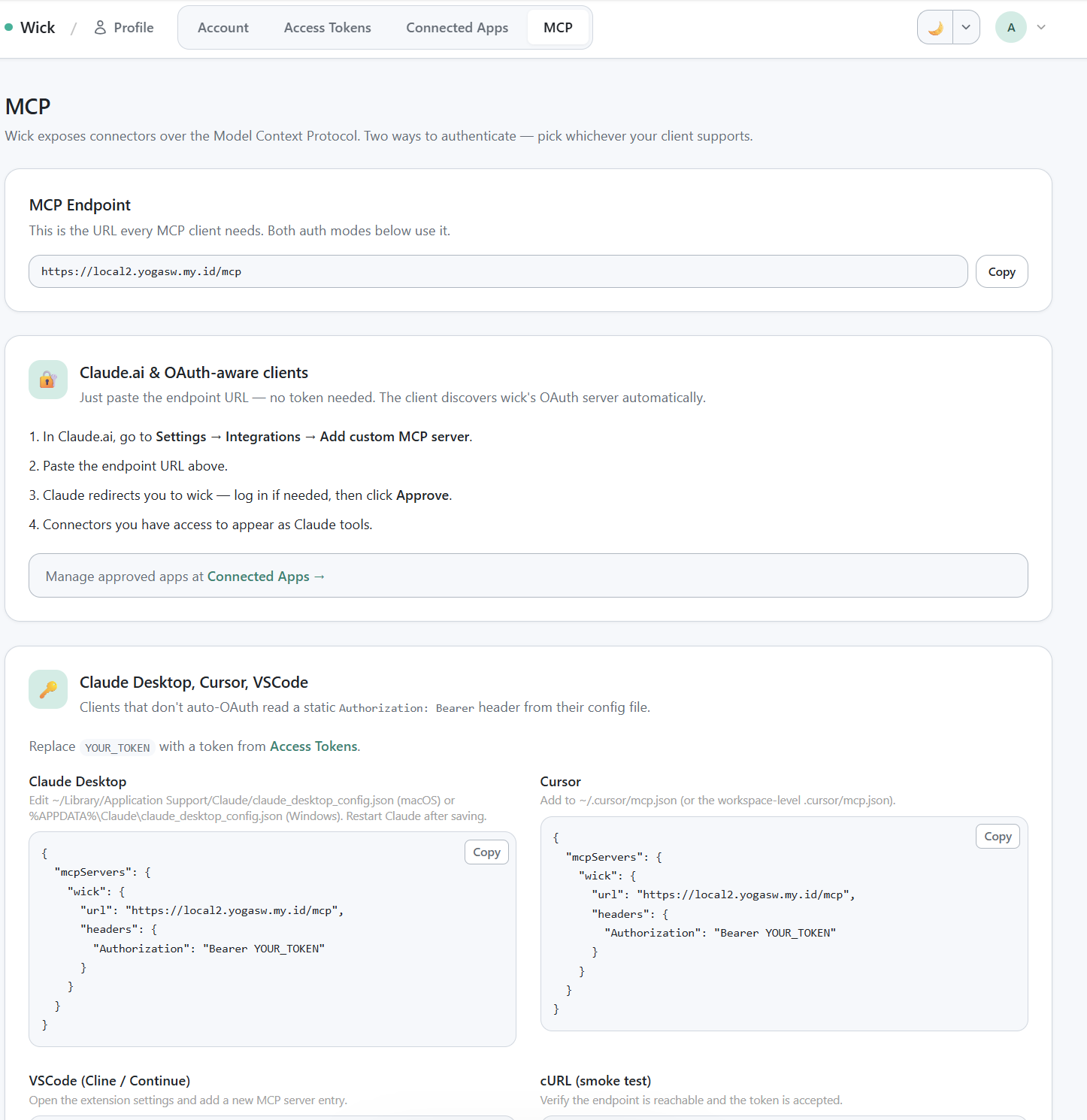
/profile/mcp install snippets — OAuth section + Bearer section with all 4 ready-to-paste snippets.
The in-app /profile/mcp page shows the URL and four install snippets ready to copy. Below is the same content for reference.
Claude.ai (OAuth)
Paste this URL into Claude.ai's MCP server settings:
https://<your-wick-host>/mcpClaude.ai will:
POST /oauth/registerto obtain aclient_id(Dynamic Client Registration, RFC 7591 — no pre-shared secret).- Redirect the browser through
/oauth/authorizefor consent. - Exchange the code at
/oauth/tokenfor an access + refresh token. - Cache the tokens; refresh on its own as needed.
If the user is not logged in to wick when the redirect lands, wick captures the destination, bounces through /auth/login (password or Google SSO), then resumes the consent flow.
Claude Desktop / Cursor / VSCode (Bearer)
Generate a Personal Access Token at /profile/tokens, then paste it into the client config.
Claude Desktop (~/Library/Application Support/Claude/claude_desktop_config.json on macOS, %APPDATA%\Claude\claude_desktop_config.json on Windows):
{
  "mcpServers": {
    "wick": {
      "command": "npx",
      "args": ["-y", "mcp-remote", "https://<your-wick-host>/mcp",
               "--header", "Authorization: Bearer ${WICK_PAT}"],
      "env": {
        "WICK_PAT": "wick_pat_xxxxxxxxxxxxxxxxxxxxxxxxxxxxxxxx"
      }
    }
  }
}
Cursor (~/.cursor/mcp.json):
{
  "mcpServers": {
    "wick": {
      "url": "https://<your-wick-host>/mcp",
      "headers": {
        "Authorization": "Bearer wick_pat_xxxxxxxxxxxxxxxxxxxxxxxxxxxxxxxx"
      }
    }
  }
}
VSCode (settings.json):
{
  "mcp.servers": {
    "wick": {
      "url": "https://<your-wick-host>/mcp",
      "headers": {
        "Authorization": "Bearer wick_pat_xxxxxxxxxxxxxxxxxxxxxxxxxxxxxxxx"
      }
    }
  }
}
cURL
curl -X POST https://<your-wick-host>/mcp \
  -H "Authorization: Bearer wick_pat_xxxxxxxxxxxxxxxxxxxxxxxxxxxxxxxx" \
  -H "Content-Type: application/json" \
  -H "Accept: application/json" \
  -d '{"jsonrpc":"2.0","method":"tools/list","id":1}'
Expect a response containing the four wick_* tools. Then call wick_list to enumerate the connector rows visible to your token's user.
curl -X POST https://<your-wick-host>/mcp \
  -H "Authorization: Bearer wick_pat_xxxxxxxxxxxxxxxxxxxxxxxxxxxxxxxx" \
  -H "Content-Type: application/json" \
  -d '{"jsonrpc":"2.0","method":"tools/call","id":2,
       "params":{"name":"wick_list","arguments":{}}}'
Local MCP (stdio)
Wick ships a built-in stdio transport so any MCP client that spawns a child process — Claude Desktop, Cursor, Gemini CLI, Codex CLI, Claude Code — can connect directly to your local project without a hosted server or PAT.
The local server runs as a synthetic local admin: all connectors are visible, no auth middleware, no token required.
Commands
wick mcp serve
Starts the MCP JSON-RPC server over stdin/stdout. Normally invoked automatically by the client; you rarely run this by hand.
wick mcp serve [--mode auto|dev|build|rebuild]| Flag | Default | Description |
|---|---|---|
--mode | auto | Build mode (see table below) |
--project | (cwd) | Project root — set automatically by mcp install, not needed when running from the project dir |
Build modes:
| Mode | Behavior |
|---|---|
auto | Rebuild only when HEAD commit changed or any .go file is newer than binary |
dev | go run . — always recompiles; no binary cache. Good while actively developing connectors |
build | Build once if binary missing, reuse otherwise |
rebuild | Always force a full rebuild |
wick mcp config
Print the ready-to-paste mcpServers JSON snippet for any client, plus show config file locations for all supported clients.
wick mcp config [--name <server-name>] [--mode auto|dev|build|rebuild]wick mcp install
Write the mcpServers entry directly into the target client's config file.
wick mcp install [--client <target>] [--name <server-name>] [--mode auto|dev|build|rebuild]--client | Config file written |
|---|---|
claude | Claude Desktop — claude_desktop_config.json |
cursor | Cursor IDE — settings.json |
gemini | Gemini CLI — ~/.gemini/settings.json |
codex | Codex CLI — ~/.codex/config.toml |
claude-code | Claude Code — ~/.claude.json |
all | All five targets |
Default --client is claude.
Wiring Claude Code
From the project root:
wick mcp install --client claude-code
# ✓ Claude Code
#   ~/.claude.json
Or for dev mode (always recompiles — no stale binary surprises):
wick mcp install --client claude-code --mode devThe merged entry inside ~/.claude.json:
{
  "mcpServers": {
    "myproject": {
      "command": "go",
      "args": ["run", ".", "mcp", "serve"],
      "cwd": "/path/to/myproject"
    }
  }
}
For auto / build / rebuild modes the entry uses the compiled wick binary with --project so the client can spawn it from any working directory:
{
  "mcpServers": {
    "myproject": {
      "command": "/path/to/wick",
      "args": ["mcp", "serve", "--mode", "auto", "--project", "/path/to/myproject"]
    }
  }
}
After saving, restart Claude Code (or reload MCP servers via /mcp). The four wick_* tools appear in Claude Code's tool list with no token required.
End-to-end test from a fresh project
- Register a connector — the scaffolded template ships
connectors/crudcrud/. Confirm it's registered inmain.go. - Boot:
wick dev. Wick auto-seeds one row at/manager/connectors/crudcrud. - Fill credentials. For crudcrud, claim a sandbox URL at https://crudcrud.com and paste it into the row's
BaseURLfield. - Smoke test in-browser. Open the row, click
[Test]next to any operation, run, verify the result panel. - Generate a PAT. Visit
/profile/tokens, click Create, copy the token from the render-once banner. - Wire up Claude Desktop. Drop the snippet above into
claude_desktop_config.json, restart Claude Desktop.
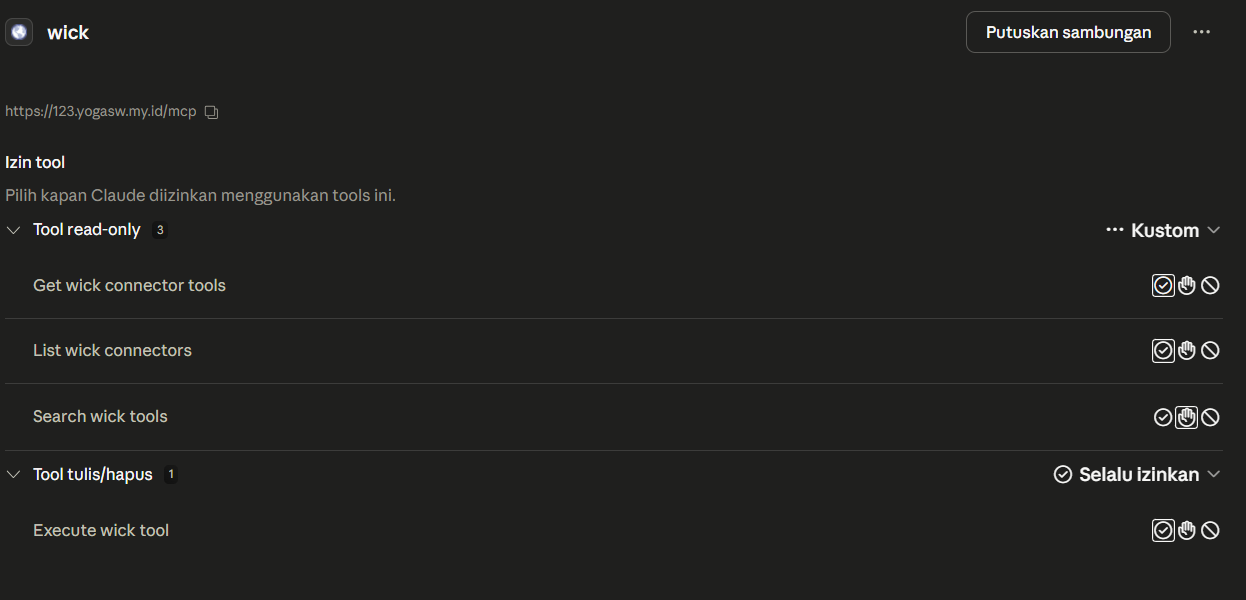
Claude Desktop Tools dialog showing the 4 wick_* tools registered after wiring a PAT.
- Try it. Ask Claude: "Use wick_list to see what connectors are available, then use wick_execute to list documents from the books resource on crudcrud."
Sessions
The Mcp-Session-Id header is generated on the first initialize call and held in-memory only — no DB row. On server restart, sessions are dropped; clients re-initialize and receive a fresh ID transparently. Auth (PAT or OAuth) is the load-bearing identity binding; the session ID is just a protocol marker.
Streaming
Default response is Content-Type: application/json — single round-trip. Wick switches to Content-Type: text/event-stream when:
- The client requested it via
Accept: text/event-stream. - The connector calls
c.ReportProgress(...)mid-execution.
Server-initiated push (GET /mcp) is not currently used. Because the meta-tool list is always four entries, notifications/tools/list_changed is unnecessary.
Audit trail
Every MCP tools/call writes a row to connector_runs with:
connector_id,operation_key,user_idsource = "mcp"(vs"test"for the in-app panel,"retry"for prefill replays)- Request and response JSON (truncatable)
status,error_msg,latency_ms,http_status- Caller IP and User-Agent
parent_run_idfor retry lineage
The data backs the history page on each connector row. Retention is enforced by the Connector Runs Purge job — default 7 days.
wick_info
Returns the running server's version and build metadata. Useful for verifying which wick version is active without leaving the LLM context.
curl -X POST https://<your-wick-host>/mcp \
  -H "Authorization: Bearer wick_pat_xxxxxxxxxxxxxxxxxxxxxxxxxxxxxxxx" \
  -H "Content-Type: application/json" \
  -d '{"jsonrpc":"2.0","method":"tools/call","id":3,
       "params":{"name":"wick_info","arguments":{}}}'
Response:
{
  "wick_version": "v0.4.1",
  "server_build_time": "2026-05-02T10:03:30Z",
  "server_commit": "924efec"
}| Field | Description |
|---|---|
wick_version | Wick framework version — from the VERSION file at build time, or from the embedded Go module info when wick is used as a library dependency |
server_build_time | When this server binary was compiled (RFC 3339 UTC) |
server_commit | Short git commit hash of the server binary at build time |
wick_version is injected automatically by wick mcp serve — no ldflags needed in downstream projects. When wick is imported as a library (require github.com/yogasw/wick v1.x.x), the version is read from Go's embedded module build info at startup.
Reference
- MCP spec: https://modelcontextprotocol.io
- Streamable HTTP transport: https://spec.modelcontextprotocol.io/specification/2025-03-26/basic/transports/#streamable-http
- OAuth 2.1: Connections
- PAT: Access Tokens